Cilium 통신 확인해보기
Cilium의 실제 네트워크 통신의 확인을 위한 페이지입니다.
노드간 파드 통신 확인
eBPF Datapath - Link
패킷의 삶 이라는 제목이 너무 눈에 익어 다시 찾아보니
이 연재작이 떠오릅니다
아주 동일한 도식화, 내용은 아니지만 꼭 같이읽어보면 좋은 글들임에는 분명하니깐요
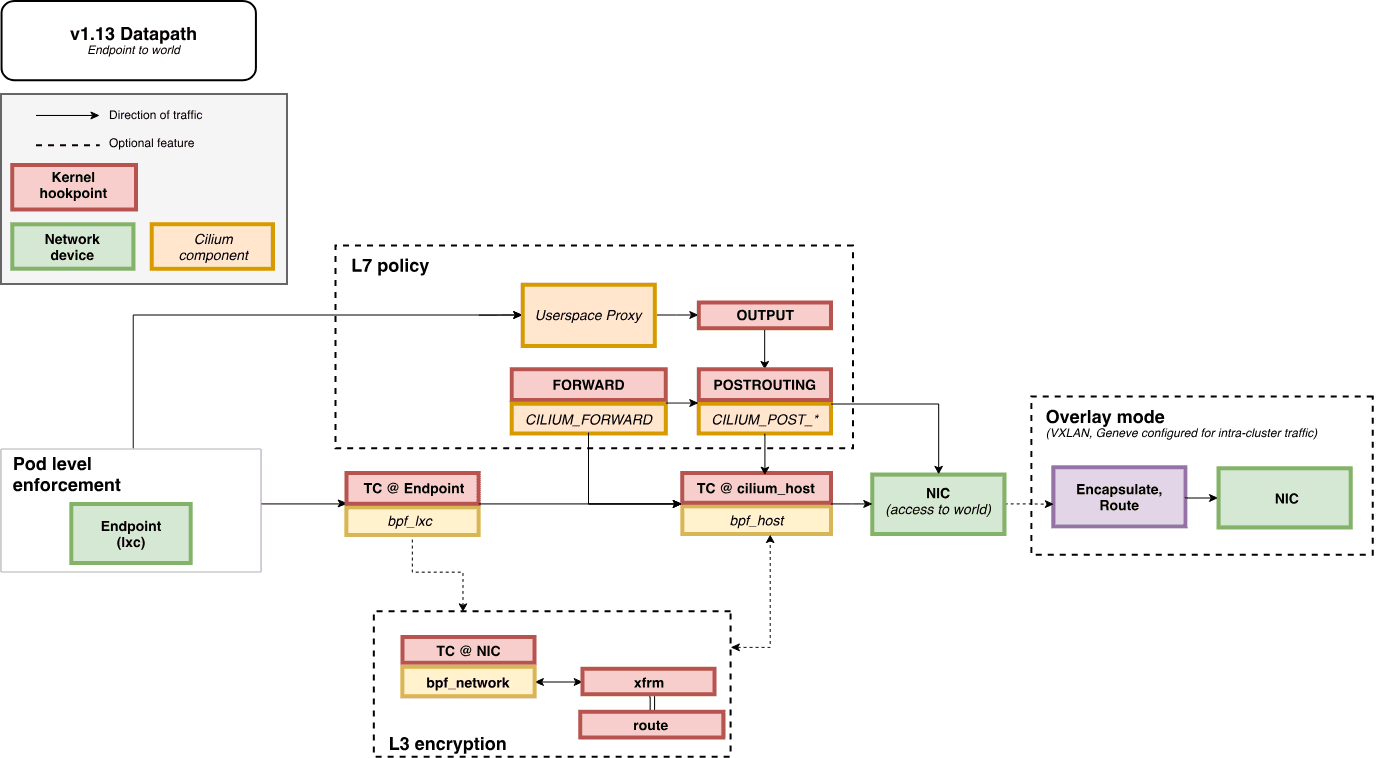
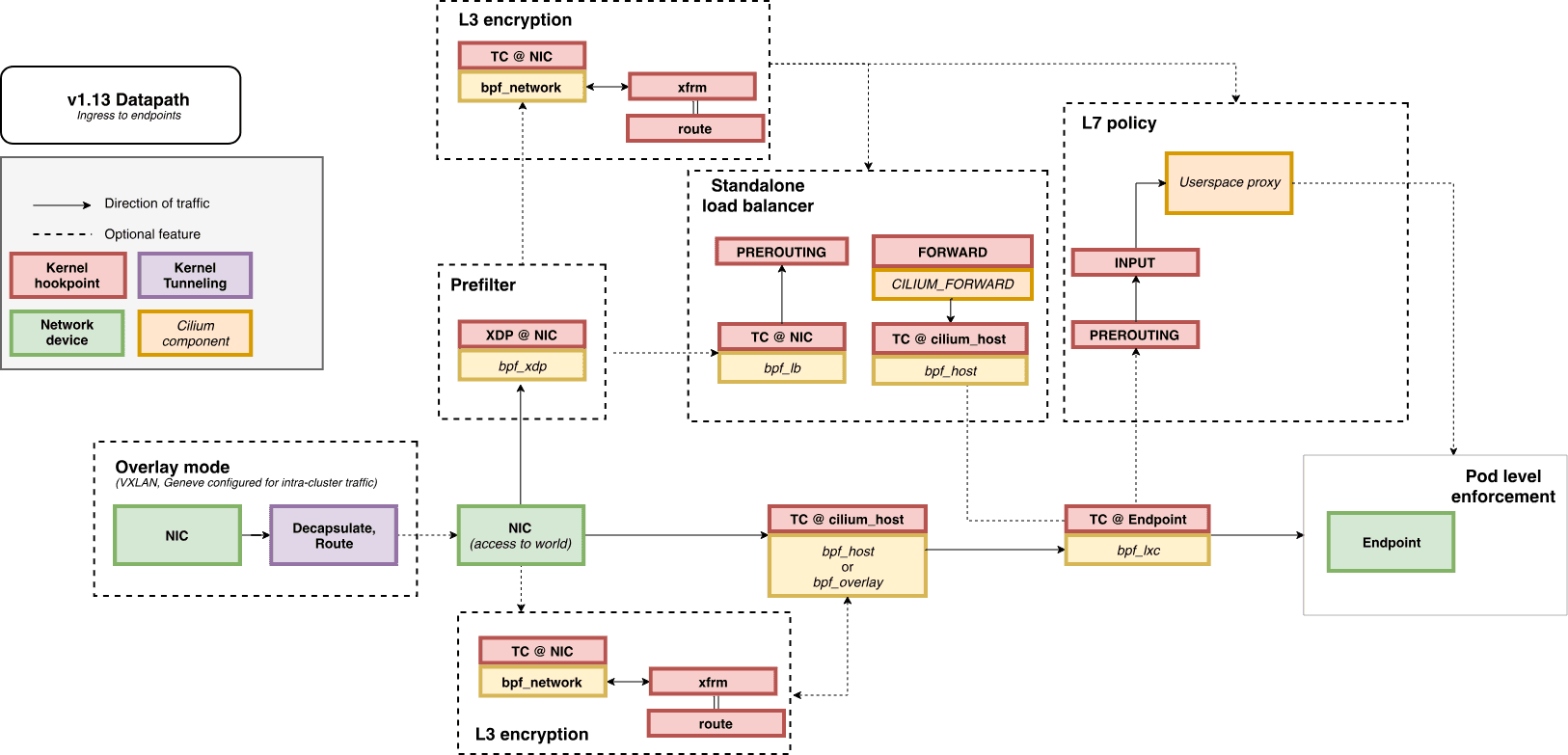
Packet Flow
- Endpoint to Endpoint
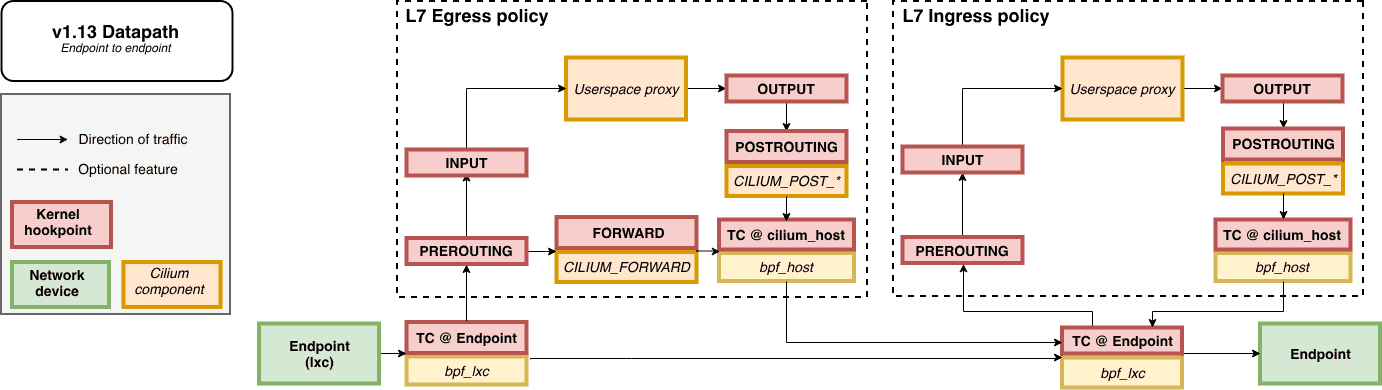
- Egress from Endpoint
- Ingress to Endpoint
파드 생성 및 확인
cat <<EOF | kubectl create -f -
apiVersion: v1
kind: Pod
metadata:
  name: netpod
  labels:
    app: netpod
spec:
  nodeName: k8s-s
  containers:
  - name: netshoot-pod
    image: nicolaka/netshoot
    command: ["tail"]
    args: ["-f", "/dev/null"]
  terminationGracePeriodSeconds: 0
---
apiVersion: v1
kind: Pod
metadata:
  name: webpod1
  labels:
    app: webpod
spec:
  nodeName: k8s-w1
  containers:
  - name: container
    image: traefik/whoami
  terminationGracePeriodSeconds: 0
---
apiVersion: v1
kind: Pod
metadata:
  name: webpod2
  labels:
    app: webpod
spec:
  nodeName: k8s-w2
  containers:
  - name: container
    image: traefik/whoami
  terminationGracePeriodSeconds: 0
EOF
# 확인
kubectl get pod -o wide
c0 status --verbose | grep Allocated -A5
c1 status --verbose | grep Allocated -A5
c2 status --verbose | grep Allocated -A5
kubectl get ciliumendpoints
kubectl get ciliumendpoints -A
c0 endpoint list
c0 bpf endpoint list
c0 map get cilium_lxc
c0 ip list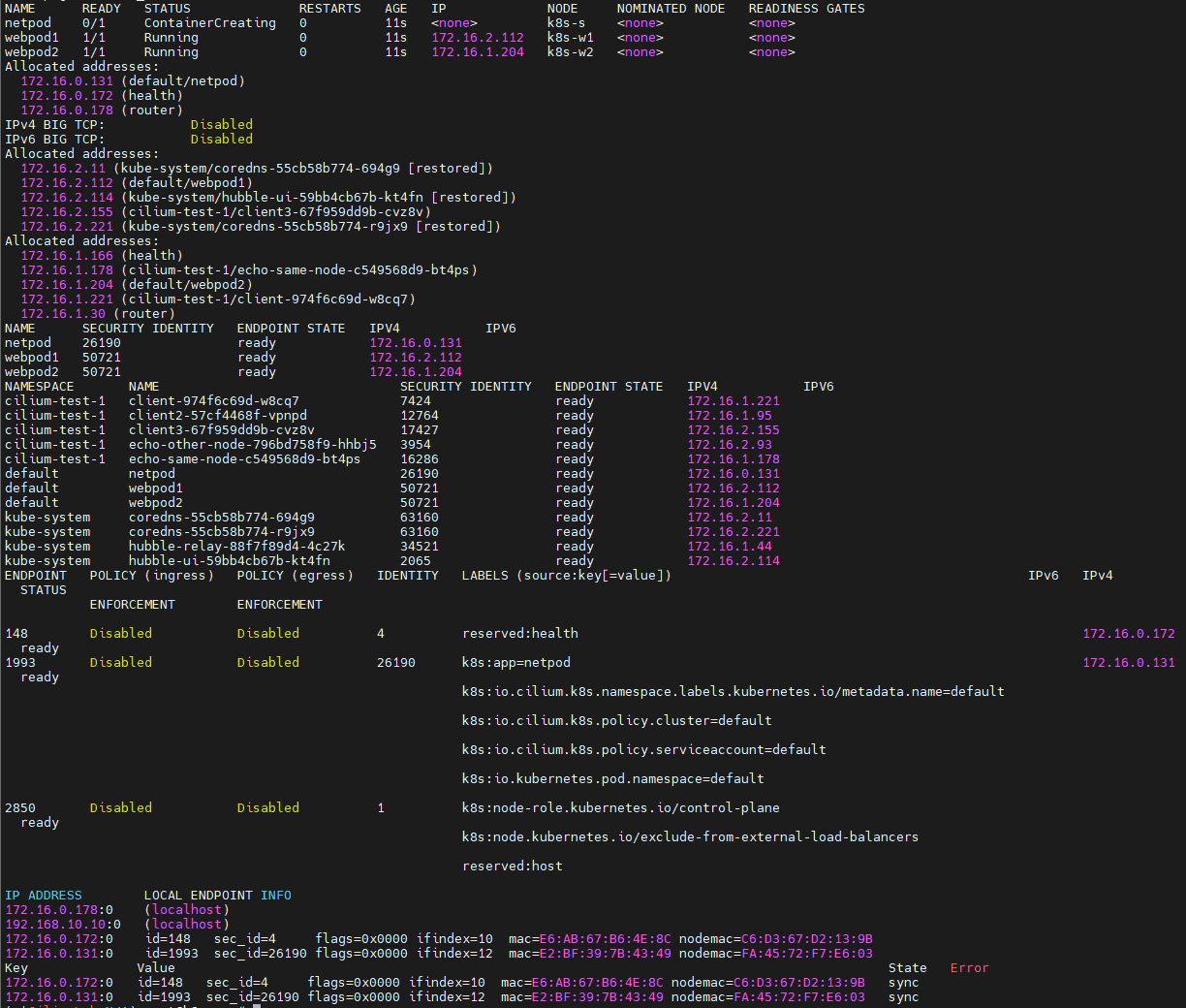
생성한 오브젝트들의 정보를 세부적으로 모니터링합니다.
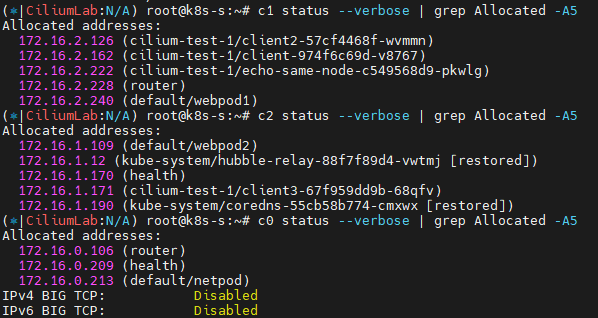
그중에서도
파드 변수 지정
# 테스트 파드들 IP
NETPODIP=$(kubectl get pods netpod -o jsonpath='{.status.podIP}')
WEBPOD1IP=$(kubectl get pods webpod1 -o jsonpath='{.status.podIP}')
WEBPOD2IP=$(kubectl get pods webpod2 -o jsonpath='{.status.podIP}')

# 단축키(alias) 지정
alias p0="kubectl exec -it netpod  -- "
alias p1="kubectl exec -it webpod1 -- "
alias p2="kubectl exec -it webpod2 -- "
파드의 ARP 동작 확인 ← Hubble Web UI 모니터링
# netpod 네트워크 정보 확인
p0 ip -c -4 addr
p0 route -n
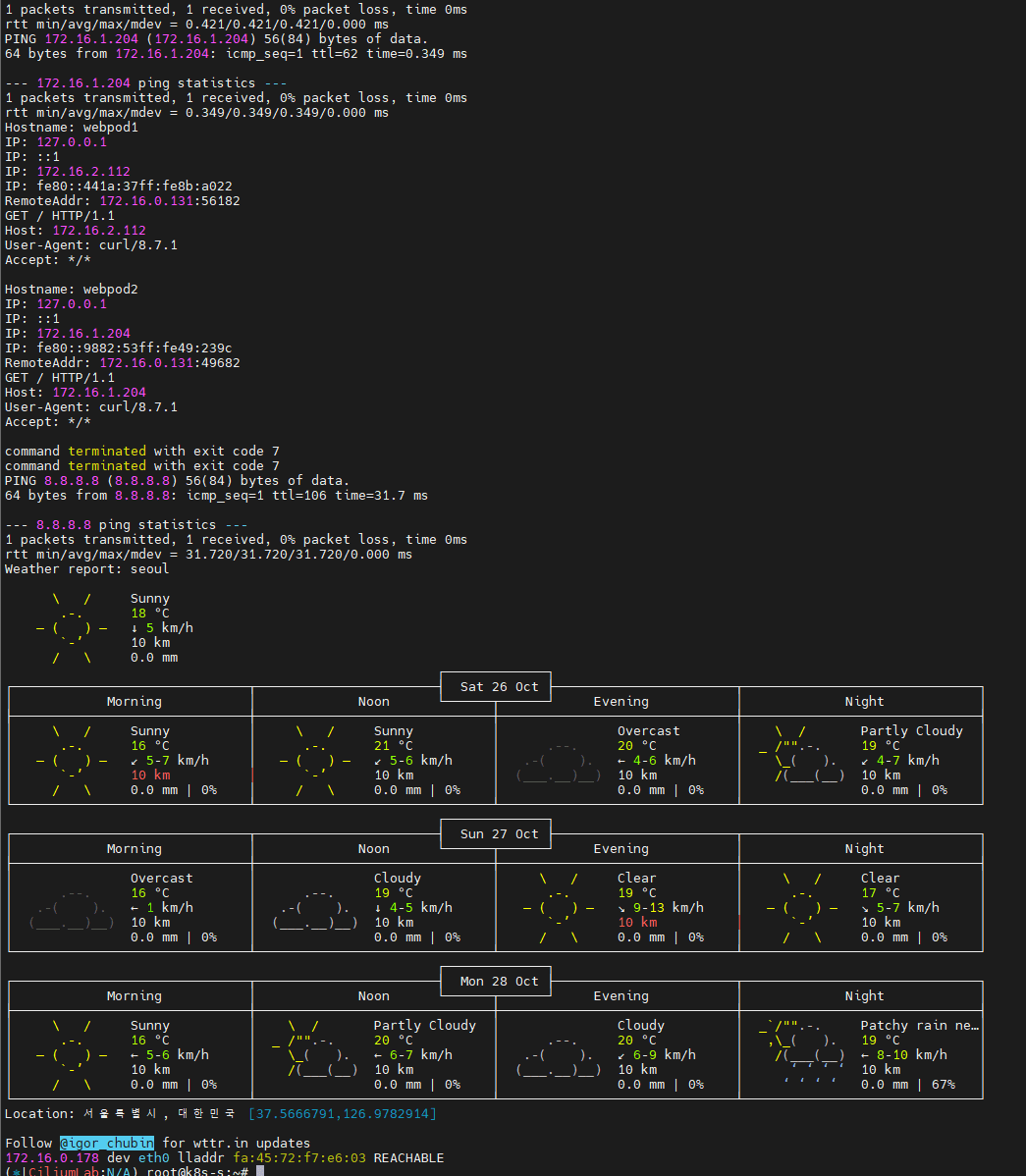
p0 ping -c 1 $WEBPOD1IP && p0 ping -c 1 $WEBPOD2IP
p0 curl -s $WEBPOD1IP && p0 curl -s $WEBPOD2IP
p0 curl -s $WEBPOD1IP:8080 ; p0 curl -s $WEBPOD2IP:8080
p0 ping -c 1 8.8.8.8 && p0 curl -s wttr.in/seoul
p0 ip -c neigh

# hubble cli 확인
hubble observe --pod netpod
hubble observe --pod webpod1
hubble observe --pod webpod2

# BPF maps : 목적지 파드와 통신 시 어느곳으로 보내야 될지 확인할 수 있다
c0 map get cilium_ipcache
c0 map get cilium_ipcache | grep $WEBPOD1IP
- Node’s eBPF programs
c0bpf net show

last_lxc_line=$(c0bpf net show | grep "lxc" | grep -v "lxc_health" | grep "cil_from" | tail -n 1)

# 필요한 값 파싱
LXC=$(echo "$last_lxc_line" | awk '{print $1}' | sed 's/(.*//')      # LXC 이름에서 ( 숫자 ) 제거
PGID=$(echo "$last_lxc_line" | awk '{print $5}')                     # prog_id 값

# Use bpftool prog show id to view additional information about a program, including a list of attached eBPF maps:
c0bpf prog show id $PGID

# 파드와 veth pair 에 IP가 없다! proxy_arp 도 없다! 하지만 GW MAC 요청 시 lxc(veth)의 MAC 으로 응답이 온다! >> eBPF Magic!
# Cilium hijacks ARP table of POD1, forces the next hop to be the peer end (host side) of the veth pair.
ip -c addr show dev $LXC# list of eBPF programs
c0bpf net show
c0bpf net show | grep $LXC

c0bpf prog show id $PGID

c0bpf map list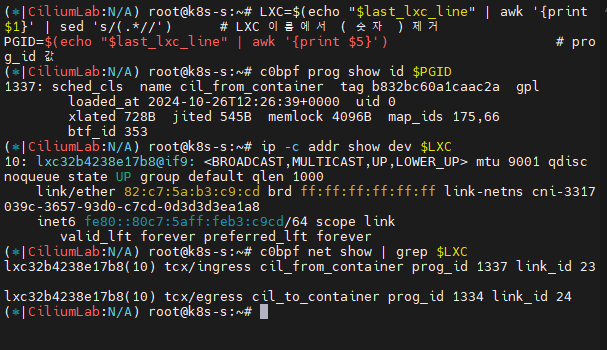
서비스 통신 확인
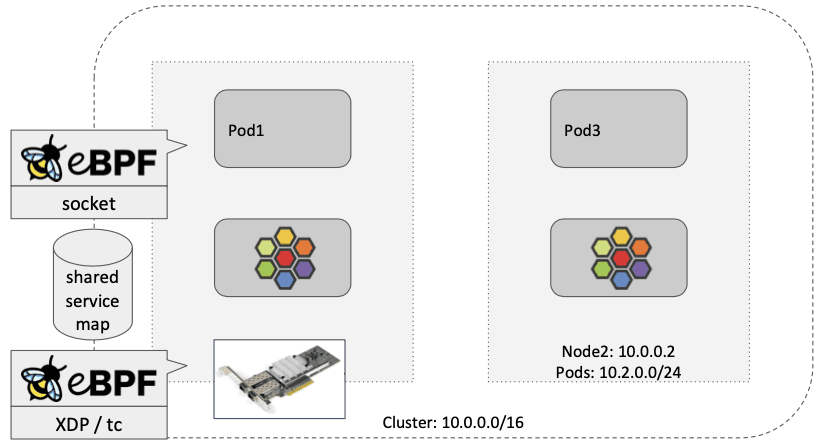
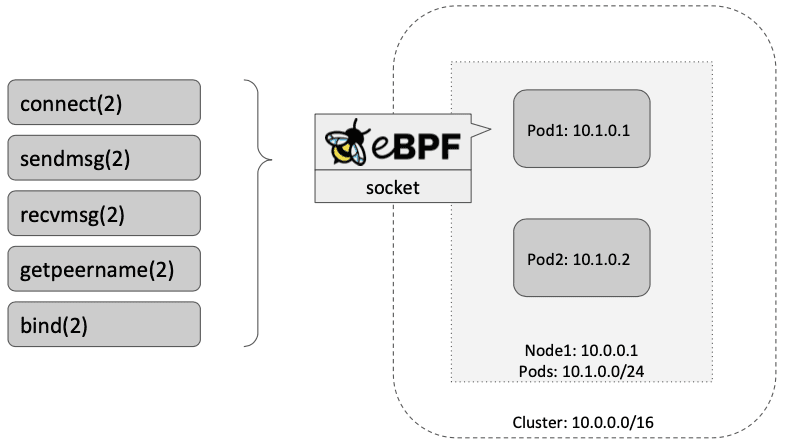
Socket-Based LoadBalancing 소개 (한글) - 링크
- 그림 왼쪽(네트워크 기반 로드밸런싱) vs 오른쪽(소켓 기반 로드밸런싱)
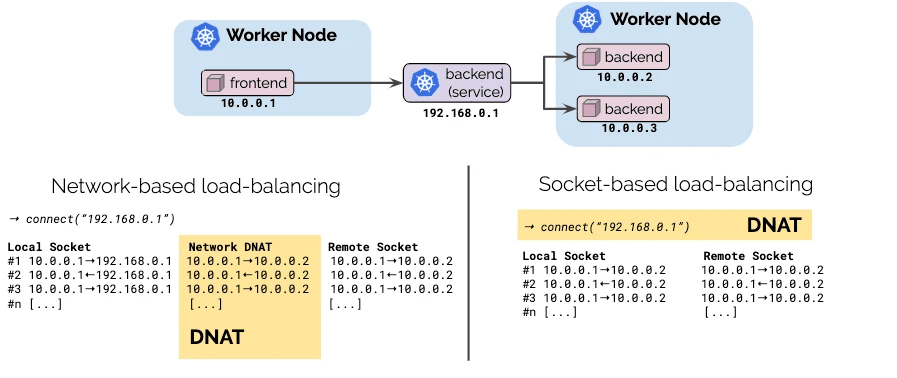
- Pod1 안에서 동작하는 앱이 connect() 시스템콜을 이용하여 소켓을 연결할 때 목적지 주소가 서비스 주소(10.10.8.55)이면 소켓의 목적지 주소를 바로 백엔드 주소(10.0.0.31)로 설정한다. 이후 앱에서 해당 소켓을 통해 보내는 모든 패킷의 목적지 주소는 이미 백엔드 주소(10.0.0.31)로 설정되어 있기 때문에 중간에 DNAT 변환 및 역변환 과정이 필요없어진다.
- destination NAT translation happens at the syscall level, before the packet is even built by the kernel.
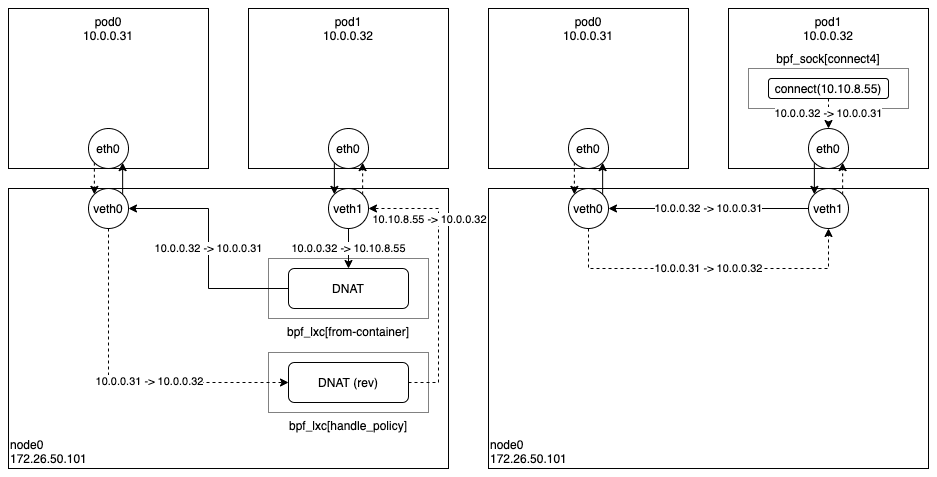
https://velog.io/@haruband/K8SCilium-Socket-Based-LoadBalancing-기법
- Socket operations : BPF socket operations program 은 root cgroup 에 연결되며 TCP event(ESTABLISHED) 에서 실행한다.
- Socket send/recv : The socket send/recv hook 은 TCP socket 의 모든 송수신 작업에서 실행, hook 에서 검사/삭제/리다이렉션을 할 수 있다
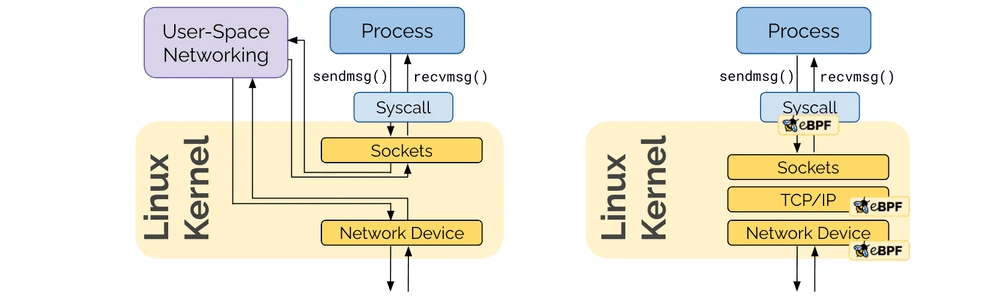
https://cilium.io/blog/2020/11/10/ebpf-future-of-networking/
- connect() 와 sendto() 소켓 함수에 연결된 프로그램(connect4, sendmsg4)에서는 소켓의 목적지 주소를 백엔드 주소와 포트로 변환하고, cilium_lb4_backends 맵에 백엔드 주소와 포트를 등록해놓는다. 이후 recvmsg() 소켓 함수에 연결된 프로그램(recvmsg4)에서는 cilium_lb4_reverse_nat 맵을 이용해서 목적지 주소와 포트를 다시 서비스 주소와 포트로 변환함.
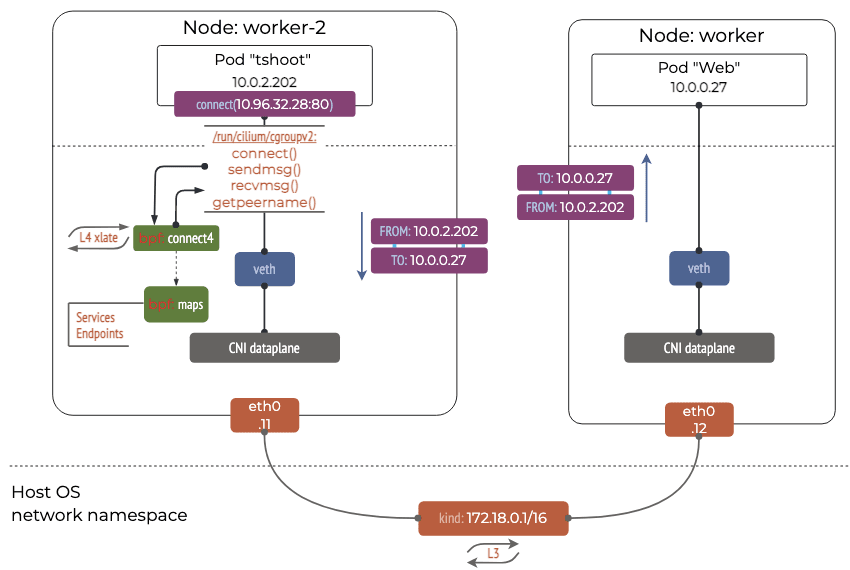
https://k8s.networkop.co.uk/services/clusterip/dataplane/ebpf/
서비스 생성 및 접속 확인 : 파드 내에서 바로 DNAT! Magic!
- 서비스 생성
cat <<EOF | kubectl create -f -
apiVersion: v1
kind: Service
metadata:
  name: svc
spec:
  ports:
    - name: svc-webport
      port: 80
      targetPort: 80
  selector:
    app: webpod
  type: ClusterIP
EOF- 서비스 접속 확인
# 서비스 생성 확인
kubectl get svc,ep svc

# 노드에 iptables 더이상 KUBE-SVC rule 이 생성되지 않는다!
iptables-save | grep KUBE-SVC
iptables-save | grep CILIUM

# 서비스IP를 변수에 지정
SVCIP=$(kubectl get svc svc -o jsonpath='{.spec.clusterIP}')

# Pod1 에서 Service(ClusterIP) 접속 트래픽 발생
kubectl exec netpod -- curl -s $SVCIP
kubectl exec netpod -- curl -s $SVCIP | grep Hostname

# 지속적으로 접속 트래픽 발생
SVCIP=$(kubectl get svc svc -o jsonpath='{.spec.clusterIP}')
while true; do kubectl exec netpod -- curl -s $SVCIP | grep Hostname;echo "-----";sleep 1;done

# 파드에서 SVC(ClusterIP) 접속 시 tcpdump 로 확인 >> 파드 내부 캡쳐인데, SVC(10.108.12.195)는 보이지 않고, DNAT 된 web-pod 의 IP가 확인! Magic!
kubectl exec netpod -- tcpdump -enni any -q
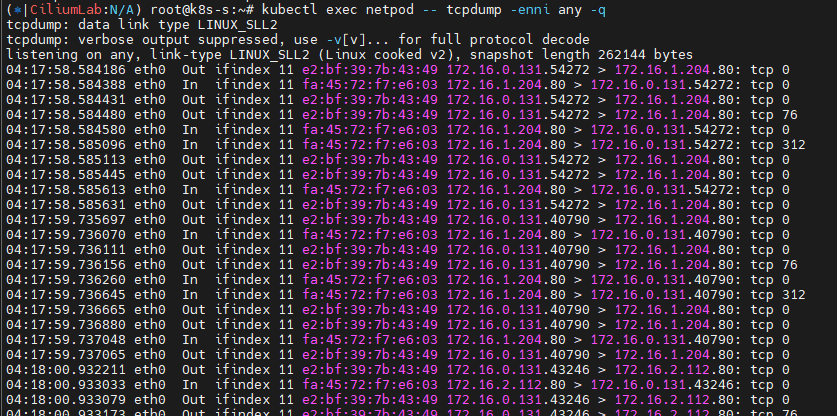
kubectl exec netpod -- sh -c "ngrep -tW byline -d eth0 '' 'tcp port 80'"

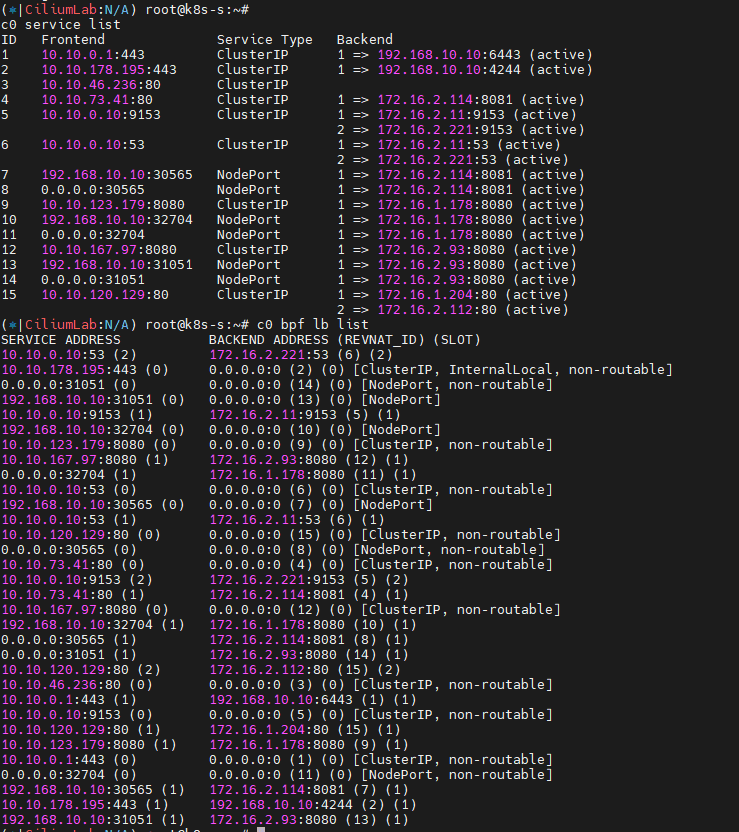
# 서비스 정보 확인
c0 service list
ID   Frontend              Service Type   Backend
16   10.108.12.195:80      ClusterIP      1 => 172.16.2.157:80
                                          2 => 172.16.1.234:80
c0 bpf lb list
SERVICE ADDRESS       BACKEND ADDRESS
10.108.12.195:80      0.0.0.0:0 (16) [ClusterIP, non-routable]
                      172.16.1.234:80 (16)
                      172.16.2.157:80 (16)
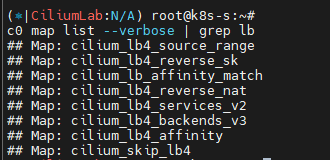
# BPF maps
c0 map list --verbose
c0 map list --verbose | grep lb
c0 map get cilium_lb4_services_v2
c0 map get cilium_lb4_backends_v3
c0 map get cilium_lb4_reverse_nat
c0 map get cilium_lb4_reverse_sk
c0 map get cilium_lxc
c0 map get cilium_ipcache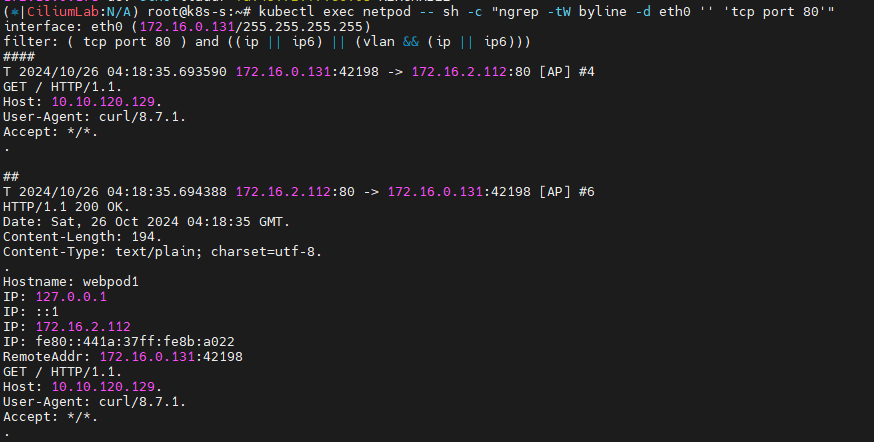
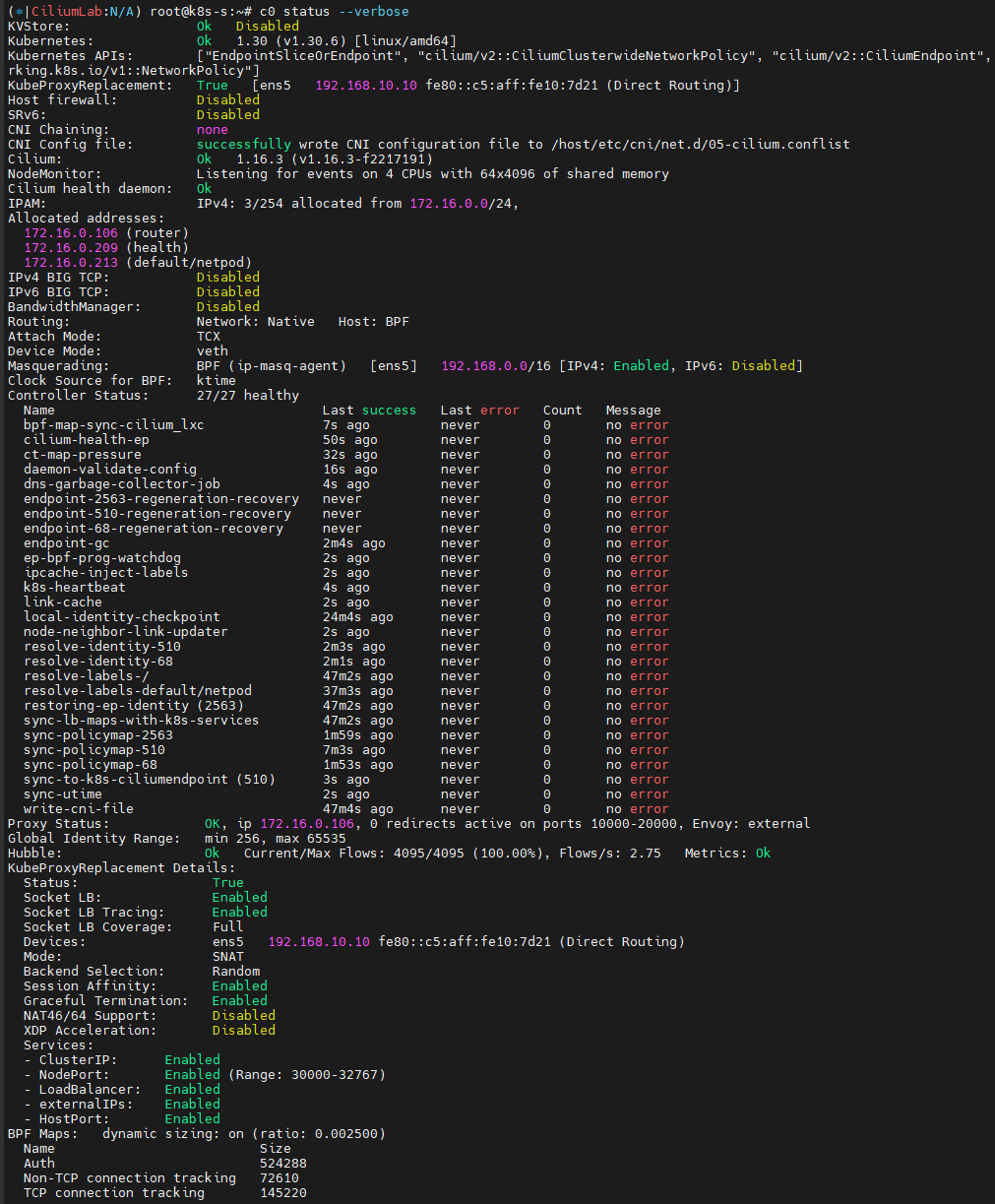
Socket-Based LoadBalancing 관련 설정값 확인 및 Cgroup 관련 정보 확인
# Socket-Based LoadBalancing 관련 설정들 확인
c0 status --verbose
# cgroup root 경로 확인
tree /run/cilium/cgroupv2 -L 1
tree /run/cilium/cgroupv2 -L 2
cilium config view | grep cgroup

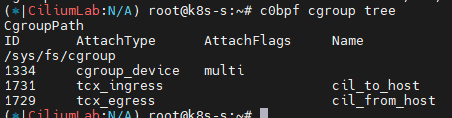
# eBPF cgroup 확인 : Socket based LB 와 관련
c0bpf cgroup tree
CgroupPath
# cilium 파드의 Init Containers 에서 cgroup 마운트!
Init Containers:
  mount-cgroup:
    Container ID:  containerd://72e9d2ee9731e3536c893f9daaa7674809638e3d137f9eb0f46fe916c2aa2839
    Image:         quay.io/cilium/cilium:v1.16.3@sha256:62d2a09bbef840a46099ac4c69421c90f84f28d018d479749049011329aa7f28
    Image ID:      quay.io/cilium/cilium@sha256:62d2a09bbef840a46099ac4c69421c90f84f28d018d479749049011329aa7f28
    Port:          <none>
    Host Port:     <none>
    Command:
      sh
      -ec
      cp /usr/bin/cilium-mount /hostbin/cilium-mount;
      nsenter --cgroup=/hostproc/1/ns/cgroup --mount=/hostproc/1/ns/mnt "${BIN_PATH}/cilium-mount" $CGROUP_ROOT;
      rm /hostbin/cilium-mount

    State:          Terminated
      Reason:       Completed
      Exit Code:    0
      Started:      Sun, 20 Oct 2024 15:45:34 +0900
      Finished:     Sun, 20 Oct 2024 15:45:34 +0900
    Ready:          True
    Restart Count:  0
    Environment:
      CGROUP_ROOT:  /run/cilium/cgroupv2
      BIN_PATH:     /opt/cni/bin
    Mounts:
      /hostbin from cni-path (rw)
      /hostproc from hostproc (rw)
      /var/run/secrets/kubernetes.io/serviceaccount from kube-api-access-p6bcr (ro)

# mount-cgroup 로그 확인
kubetail -n kube-system -c mount-cgroup --since 12h
...
[cilium-lnwcr] time="2024-10-20T15:45:52+09:00" level=info msg="Mounted cgroupv2 filesystem at /run/cilium/cgroupv2" subsys=cgroups
[cilium-jmr7d] time="2024-10-20T15:45:33+09:00" level=info msg="Mounted cgroupv2 filesystem at /run/cilium/cgroupv2" subsys=cgroups
...
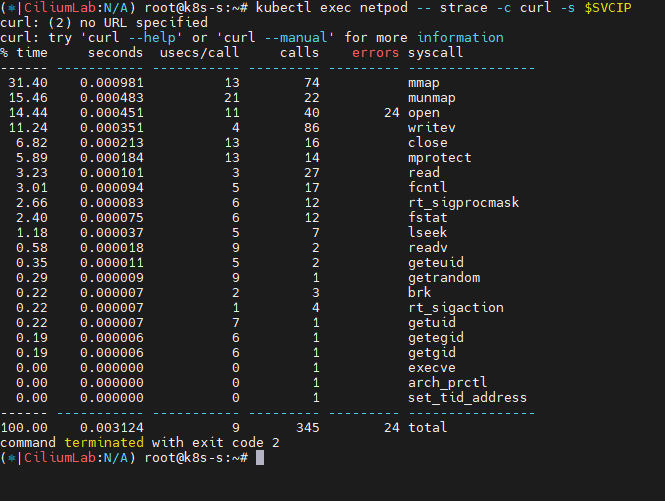
strace 시스템 콜 트레이싱 도구를 통해 파드 내에서 동작 확인
# syacall 호출 확인
kubectl exec netpod -- strace -c curl -s $SVCIP
모니터링으로 확인해보기
설정 - Docs
# 배포
kubectl apply -f https://raw.githubusercontent.com/cilium/cilium/1.16.3/examples/kubernetes/addons/prometheus/monitoring-example.yaml
kubectl get all -n cilium-monitoring

# 파드와 서비스 확인
kubectl get pod,svc,ep -o wide -n cilium-monitoring

# NodePort 설정
kubectl patch svc grafana -n cilium-monitoring -p '{"spec": {"type": "NodePort"}}'
kubectl patch svc prometheus -n cilium-monitoring -p '{"spec": {"type": "NodePort"}}'

# Grafana 웹 접속
GPT=$(kubectl get svc -n cilium-monitoring grafana -o jsonpath={.spec.ports[0].nodePort})
echo -e "Grafana URL = http://$(curl -s ipinfo.io/ip):$GPT"

# Prometheus 웹 접속 정보 확인
PPT=$(kubectl get svc -n cilium-monitoring prometheus -o jsonpath={.spec.ports[0].nodePort})
echo -e "Prometheus URL = http://$(curl -s ipinfo.io/ip):$PPT"- grafana , prometheus NodePort 로 웹 접속 후 확인
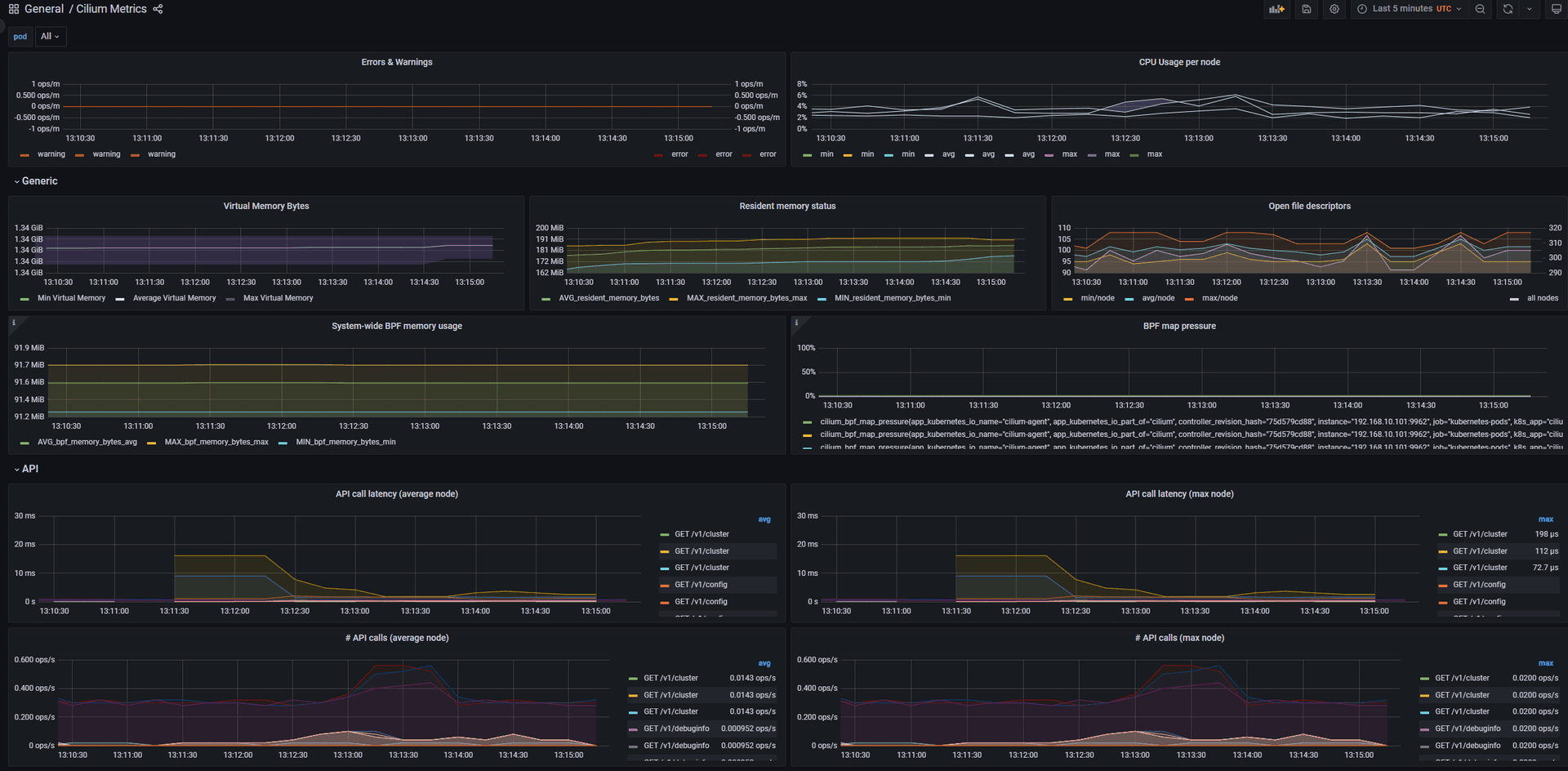
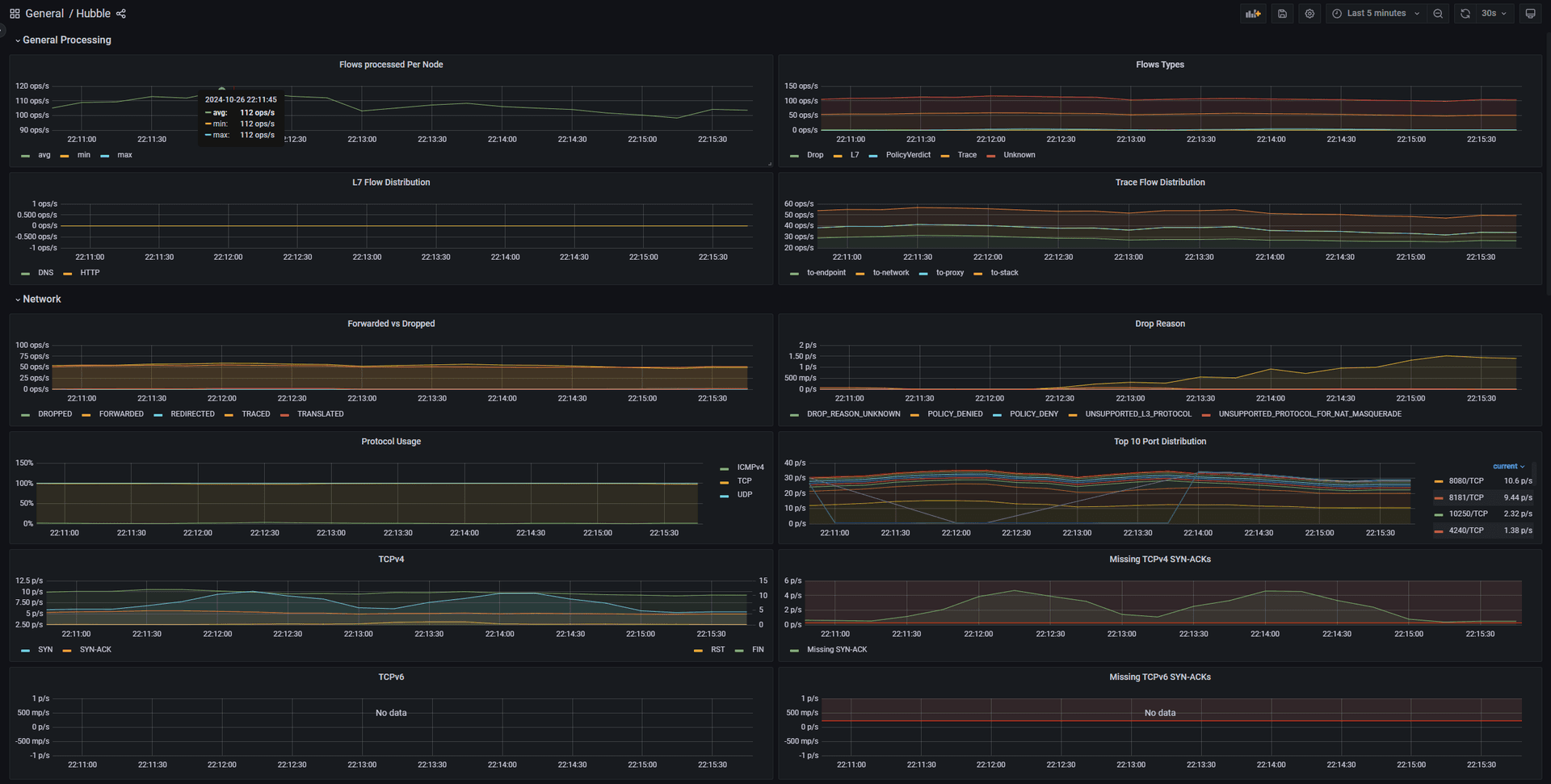
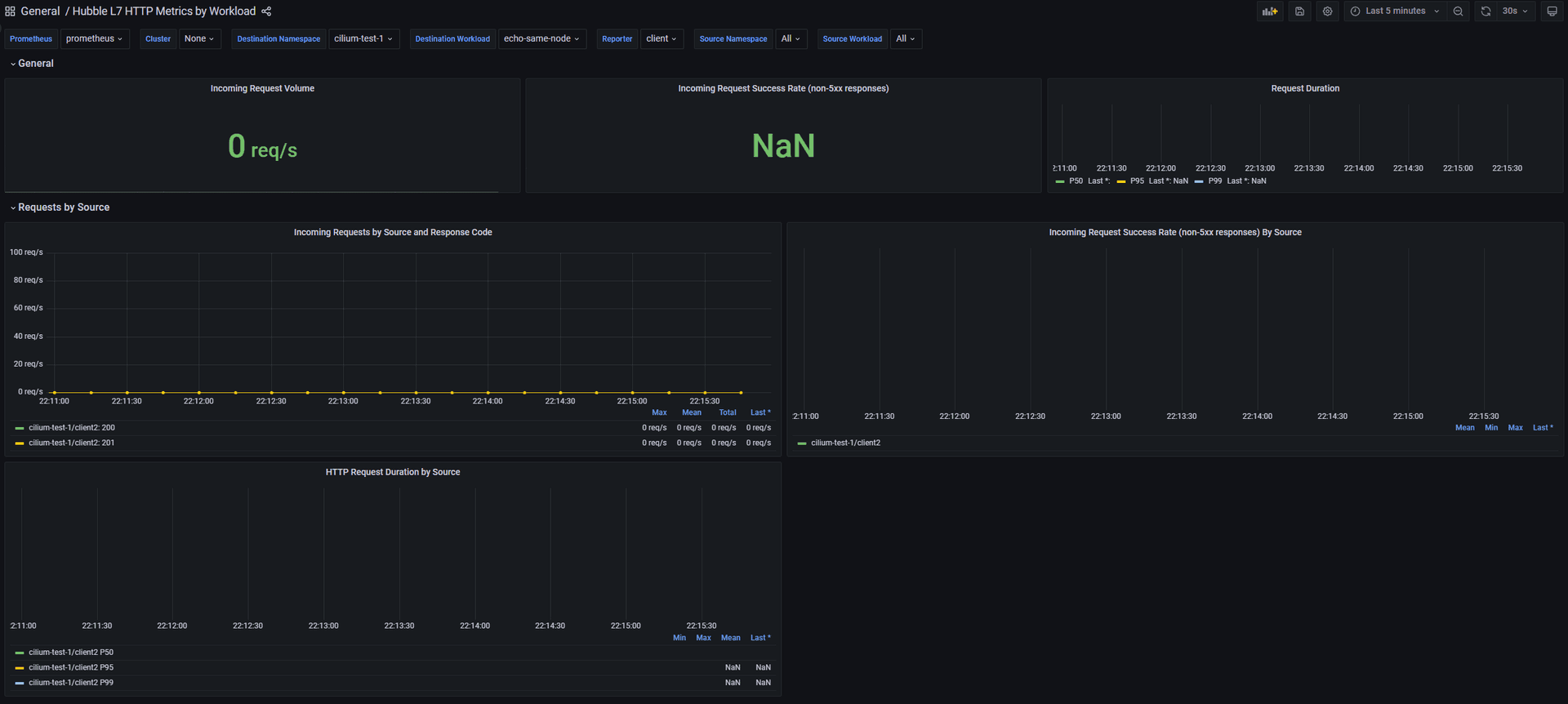
보다 다양한 메트릭들이 존재하네요.
Direct Server Return (DSR)
DSR (Direct Server Return) 소개 - 참고링크
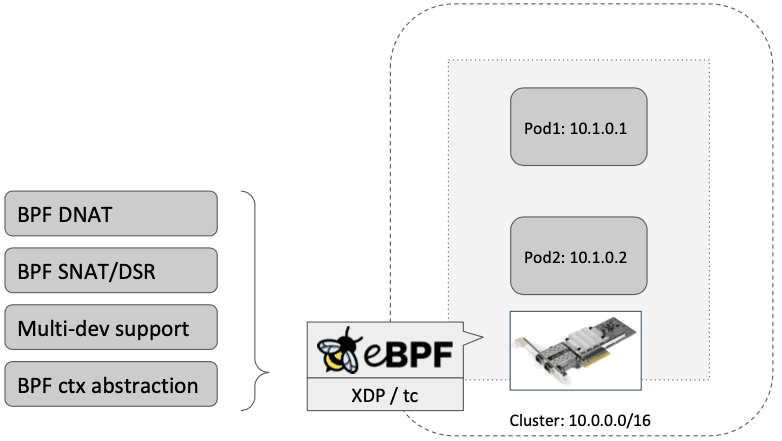
- 기본 SNAT 사용 시 : kube-proxy 환경에서 NodePort 접속 시
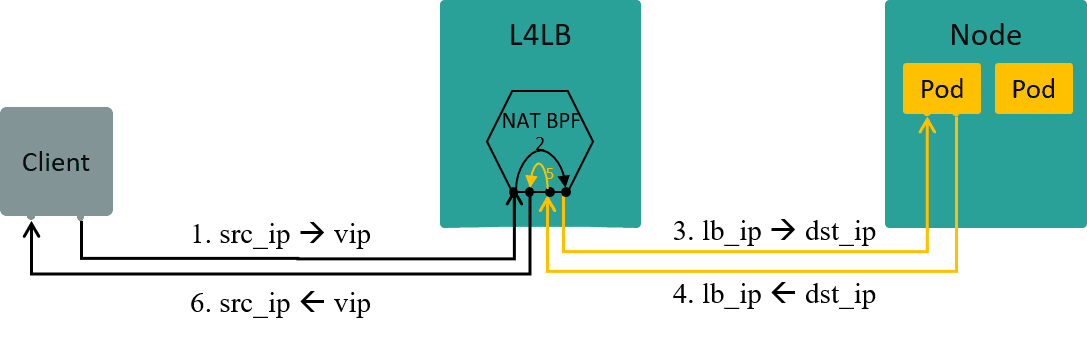
https://arthurchiao.art/blog/k8s-l4lb/
- DSR 사용 시
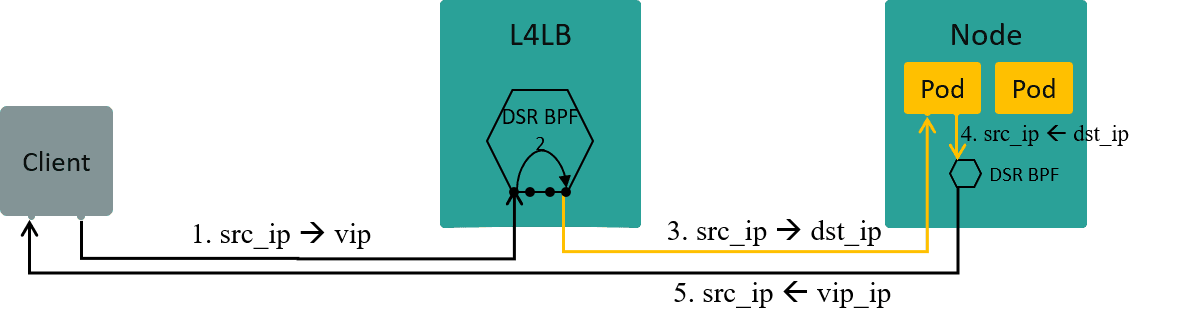
https://arthurchiao.art/blog/k8s-l4lb/
- cilium XDP DSR with IPIP Encapsulation and L4 DNAT
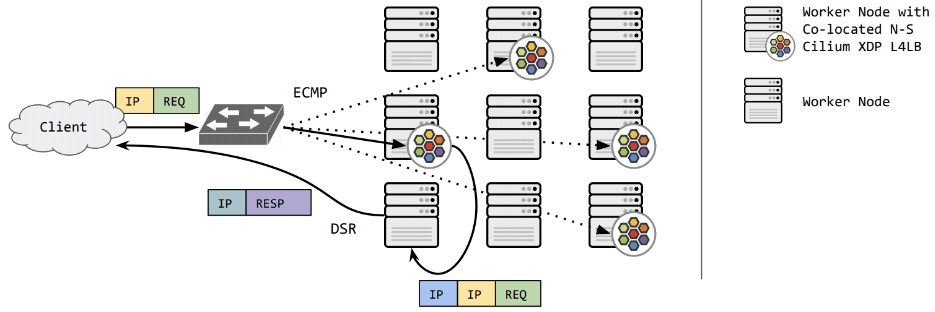
https://cilium.io/blog/2021/05/20/cilium-110
DSR 설정 - 링크
- 반드시 Tunnel mode 가 Disabled → 즉 Native Routing 모드에서만 DSR 동작함
- Ubuntu focal64 LTS(Linux 5.4.0-99-generic) 는 DSR 동작 불가
# 설정 : 미리 설정 되어 있음
VERSION=1.11.2
helm upgrade cilium cilium/cilium --version $VERSION --namespace kube-system --reuse-values --set loadBalancer.mode=dsr

# cilium 파드 재시작 >> 단축키 재설정
kubectl -n kube-system rollout restart ds/cilium

# DSR 모드 확인
cilium config view | grep dsr
bpf-lb-mode                                    dsr

c0 status --verbose | grep 'KubeProxyReplacement Details:' -A7
KubeProxyReplacement Details:
  Status:                Strict
  Socket LB Protocols:   TCP, UDP
  Devices:               enp0s3 10.0.2.15, enp0s8 192.168.10.10 (Direct Routing)
  Mode:                  DSR
  Backend Selection:     Random
  Session Affinity:      Enabled
XDP Acceleration: Disabled - TCP 는 DSR, UDP 는 SNAT 으로 동작하는 Hybrid DSR 모드도 있음.
파드와 서비스 생성
cat <<EOF | kubectl create -f -
apiVersion: v1
kind: Pod
metadata:
  name: netpod
  labels:
    app: netpod
spec:
  nodeName: k8s-m
  containers:
  - name: netshoot-pod
    image: nicolaka/netshoot
    command: ["tail"]
    args: ["-f", "/dev/null"]
  terminationGracePeriodSeconds: 0
---
apiVersion: v1
kind: Pod
metadata:
  name: webpod1
  labels:
    app: webpod
spec:
  nodeName: k8s-w1
  containers:
  - name: container
    image: traefik/whoami
  terminationGracePeriodSeconds: 0
---
apiVersion: v1
kind: Service
metadata:
  name: svc1
spec:
  ports:
    - name: svc1-webport
      port: 80
      targetPort: 80
  selector:
    app: webpod
  type: NodePort
EOF
# 파드 서비스 정보
kubectl get pod -o wide
kubectl get svc svc1
# map list 확인
c0 map list --verbose
c1 map list --verbose동작 링크 Magic!
https://arthurchiao.art/blog/k8s-l4lb/
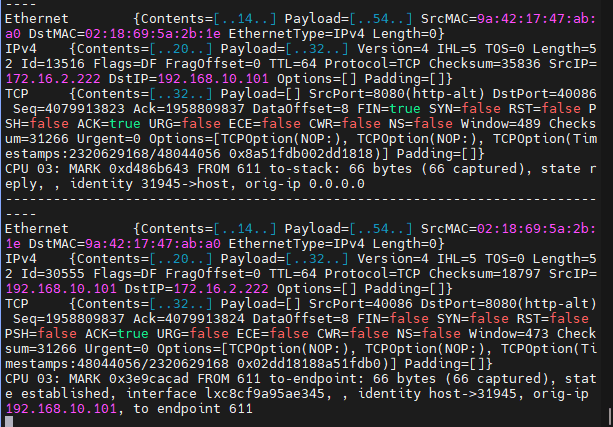
- DSR 사용 시 ip 옵션 헤더(‘목적지포트 + ? + 목적지IP’ )에 최초 접속한 노드의 ip 정보를 담아서 타겟 노드로 전달한다.
- 타켓 노드는 전달받은 IP 옵션 헤더에 저장된 원래의 목적지 주소를 cilium_snat_v4_external 맵에 저장해놓고, conntrack 맵에 변환 정보를 추가한다.
- 이후 파드가 응답 패킷을 만들어 전송하면 파드의 veth LXC의 bpf_lxc.c #from-container 에서, conntrack 맵에 저장된 정보를 이용하여 cilium_snat_v4_external 맵에서 필요한 정보를 가져와서 응답 패킷의 출발지 주소를 원래 클라이언트가 접속한 주소로 변환한다. 이러한 과정을 통해 클라이언트는 패킷을 보낸 주소 그대로 패킷을 받게 되는 것이다. Magic!
- 또한, 클라이언트 IP(접속자 IP)는 파드까지 보존되어서 도달한다.
# 서비스(NodePort)를 확인
kubectl get svc svc1 -o jsonpath='{.spec.ports[0].nodePort}';echo
32465

------------------------------------------------------------------------------
# k8s-pc 나 자신의 PC 에서 Service(NodePort) 접속 트래픽 발생
SVCNPORT=$(kubectl get svc svc1 -o jsonpath='{.spec.ports[0].nodePort}')
curl -s k8s-m:$SVCNPORT
curl -s k8s-m:$SVCNPORT | grep Hostname

# k8s-pc 나 자신의 PC 에서 지속적으로 접속 트래픽 발생
while true; do curl -s k8s-m:$SVCNPORT | grep Hostname;echo "-----";sleep 1;done
------------------------------------------------------------------------------
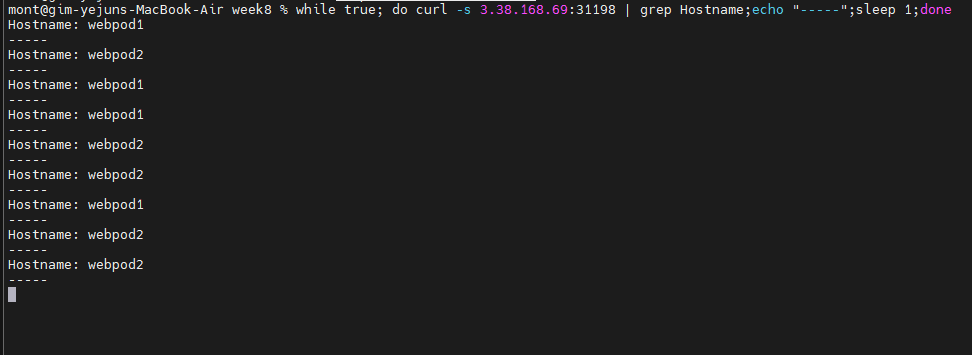
# 모니터링 : 워커노드에 최초 TCP SYN 에 IP옵션 헤더값 포함된 패킷 확인! >> 아래 처럼 출력된 IPv4Option 에 맨 뒤부터 읽으면 된다!
c0 monitor # 없다!
c1 monitor -vv
# 패킷 덤프 - 마스터노드
NODEPORT=$(kubectl get svc svc1 -o jsonpath='{.spec.ports[0].nodePort}')
echo $NODEPORT
tcpdump -i any tcp port 80 or tcp port $NODEPORT -w /tmp/dsr1.pcap

# 패킷 덤프 - 워커노드
NODEPORT=$(kubectl get svc svc1 -o jsonpath='{.spec.ports[0].nodePort}')
tcpdump -eni any tcp port 80 or tcp port $NODEPORT -q -v -X                        ....

# 실습 완료 후 삭제
kubectl delete svc svc1 && kubectl delete pod webpod1 netpod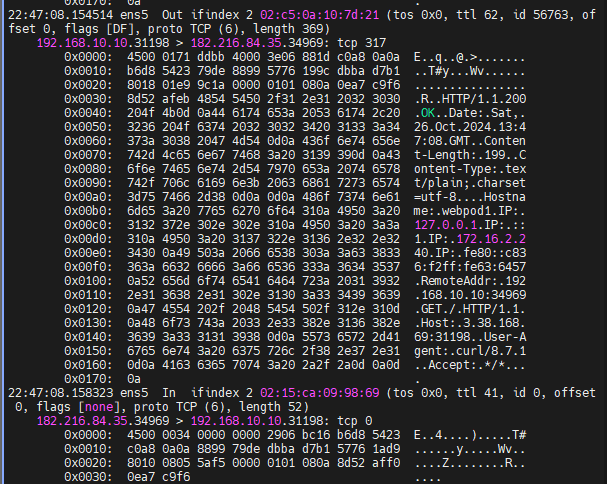
- IP 헤더 정보
192.168.10.10.31198 > 182.216.84.35.34969: tcp 317:- 송신 IP 및 포트:
192.168.10.10에서 포트31198를 통해 데이터 전송. - 수신 IP 및 포트:
182.216.84.35의 포트34969가 데이터 수신. tcp 317: TCP 패킷에 데이터317바이트가 포함됨.
- 송신 IP 및 포트:
- 패킷의 헤더 내용
4500 0171 ddbb 4000 3e06 881d c0a8 0a0a b6d8 5423:4500: IPv4 버전, IP 헤더 길이20바이트.0171: 전체 패킷 길이 (369바이트).c0a8 0a0a: 송신 IP 주소 (192.168.10.10).b6d8 5423: 수신 IP 주소 (182.216.84.35).
- TCP 헤더
79de 8899 5776 199c dbba d7b1:79de: 송신 포트 (31198).8899: 수신 포트 (34969).5776 199c: Sequence 번호.dbba d7b1: Acknowledgment 번호.
- HTTP 응답 정보
HTTP/1.1 200 OK: 요청이 성공적으로 처리됨을 의미.Date: Sat, 26 Oct 2024 13:47:08 GMT: 응답 날짜 및 시간.Content-Length: 199: 콘텐츠 길이199바이트.Content-Type: text/plain; charset=utf-8: 콘텐츠 타입.
- HTTP 헤더 정보
Hostname: webpod1:webpod1이라는 호스트 이름.RemoteAddr: 192.168.10.10:34969: 클라이언트 IP 및 포트 (192.168.10.10:34969).
- 추가 정보
Host: 3.38.168.69:31198: 요청을 수신한 서버 IP 및 포트 (3.38.168.69:31198).User-Agent: curl/8.7.1:curl을 통해 요청된 것임.
참고 : 전통적인 L4 장비에서 L2 DSR 동작 - 서버에 Loopback 설정이 필요했음
Cisco Modular Load Balancer 이해하기 (PDF)
Network Policy (L3, L4, L7)
Security
- Securing Networks with Cilium - Link
- Identity-Aware and HTTP-Aware Policy Enforcement - Link
- Locking Down External Access with DNS-Based Policies - Link
- Inspecting TLS Encrypted Connections with Cilium - Link
- Securing a Kafka Cluster - Link
- Securing gRPC - Link
- Securing Elasticsearch - Link
- Securing a Cassandra Database - Link
- Securing Memcached - Link
- Locking Down External Access Using AWS Metadata - Link
- Creating Policies from Verdicts - Link
- Host Firewall - Link
- Restricting privileged Cilium pod access - Link
- Overview of Network Security - Link
- Overview of Network Policy - Link
- Threat Model - Link
cilium Security Intro : Cilium provides security on multiple levels - Docs
-
ID 기반 Identity-Based : Connectivity policies between endpoints (Layer 3), e.g. any endpoint with label
role=frontendcan connect to any endpoint with labelrole=backend.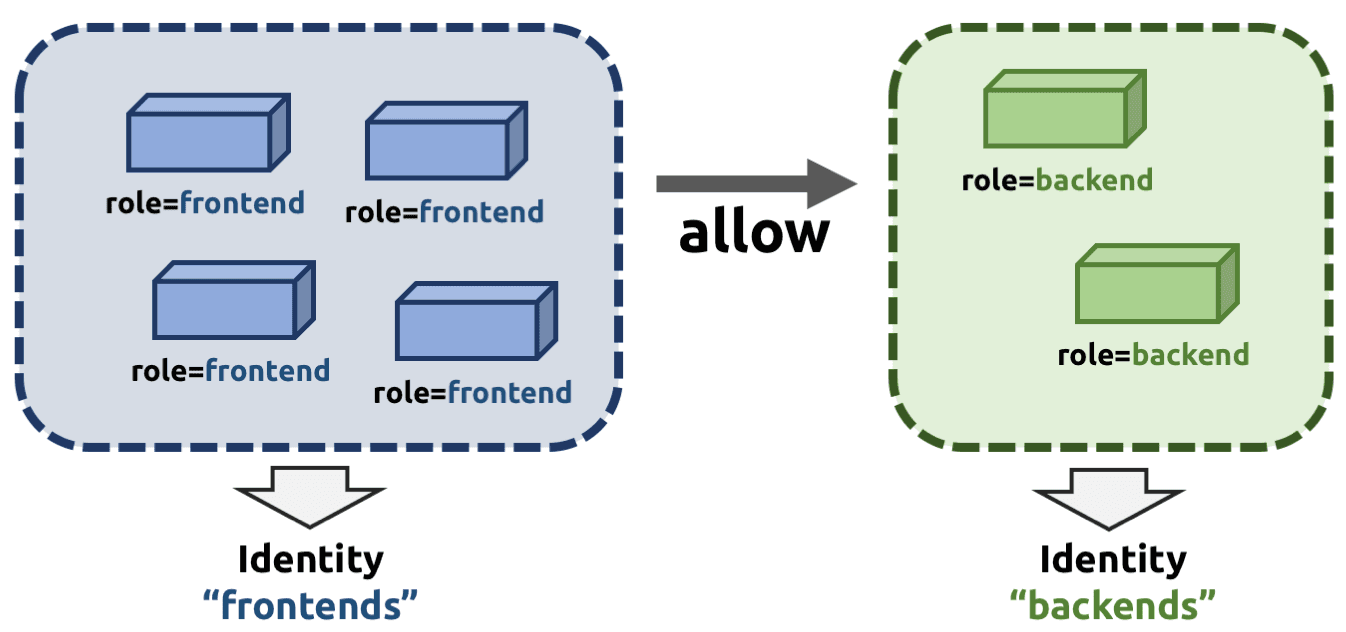
https://docs.cilium.io/en/stable/security/network/identity/
포트 기반 접근 제어 (Layer 4)
들어오고 나가는 연결에 대해 접근 가능한 포트를 제한합니다.
예시:
role=frontend라벨이 있는 엔드포인트는 오직 포트 443(https)으로 나가는 연결만 가능하고,role=backend라벨이 있는 엔드포인트는 포트 443(https)으로 들어오는 연결만 허용됩니다.애플리케이션(HTTP) 기반 접근 제어
애플리케이션 프로토콜 레벨에서의 세부적인 접근 제어로, HTTP 및 원격 프로시저 호출(RPC) 프로토콜을 보호합니다.
- 예시:
role=frontend라벨이 있는 엔드포인트는GET /userdata/[0-9]+REST API 호출만 가능하며,role=backend와의 다른 모든 API 상호작용은 제한됩니다.
프록시 주입: Envoy
- Cilium은 모든 네트워크 연결에 Layer 4 프록시를 투명하게 주입할 수 있습니다. 이를 통해 고급 네트워크 정책을 적용하는 기초가 됩니다. (예: DNS 기반 및 Layer 7 정책 예시 )
- 예시:
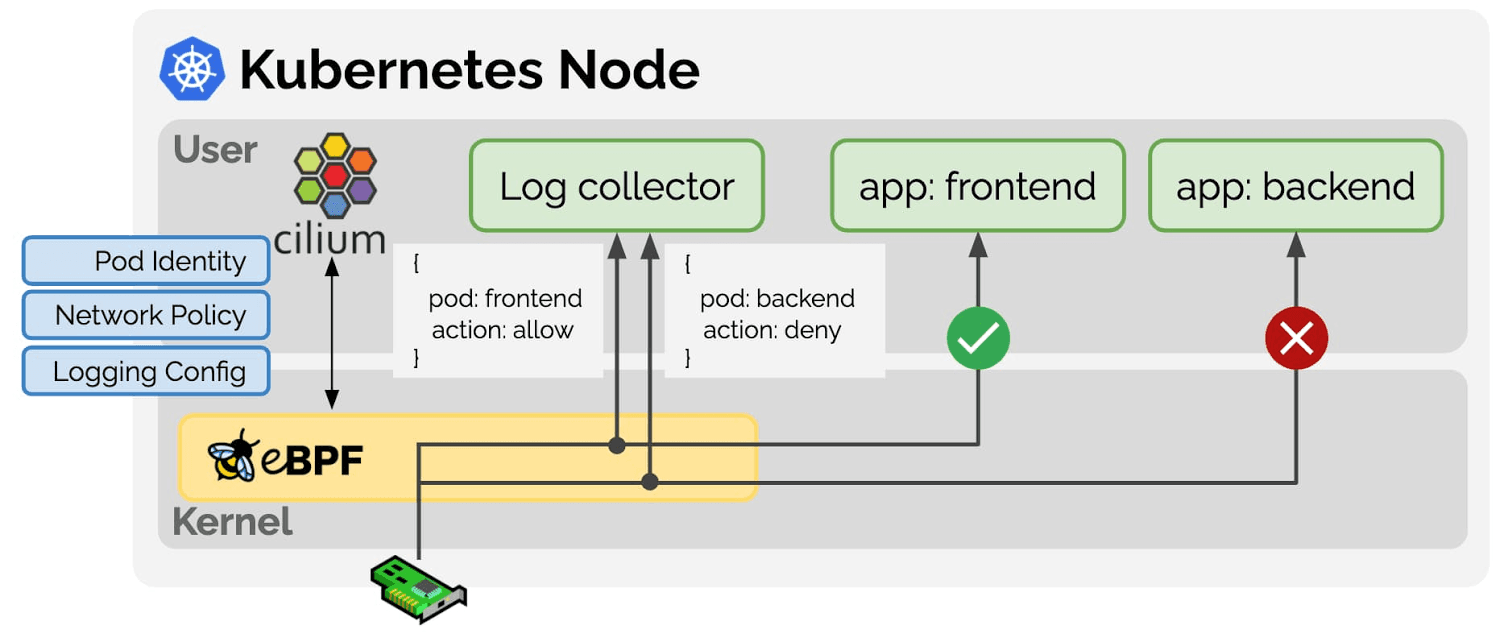
Network Policy 관련 eBPF Datapath
-
Prefilter: An XDP program and provides a set of prefilter rules used to filter traffic from the network for best performance.
-
Endpoint Policy: 정책에 따라 패킷을 차단/전달하거나, 서비스로 전달하거나, L7 로 정책 전달 할 수 있다.
- the Cilium datapath responsible for mapping packets to identities and enforcing L3 and L4 policies.
-
L7 Policy: The L7 Policy object redirect proxy traffic to a Cilium userspace proxy instance. Cilium uses an Envoy instance as its userspace proxy. Envoy will then either forward the traffic or generate appropriate reject messages based on the configured L7 policy.
→ L7 정책는 커널 hookpoint 와 Userspace Proxy 사용으로 성능이 조금 떨어질 수 있다
Deploy the Demo Application - Docs
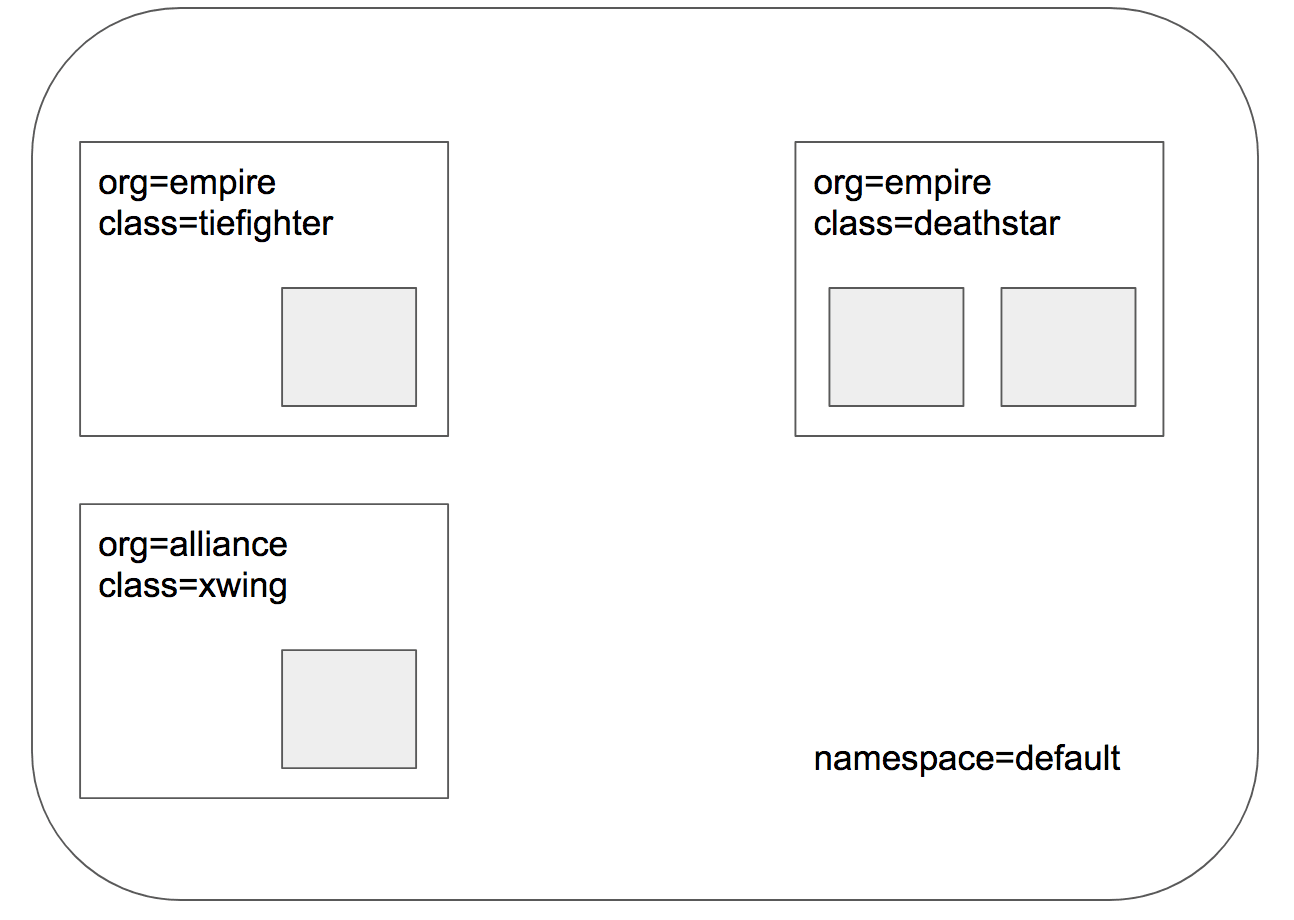
- 스타워즈에서 영감 받은 예제 : 디플로이먼트(웹 서버, deathstar, replicas 2), 파드(xwing, tiefighter), 서비스(ClusterIP, service/deathstar)
# 배포
kubectl create -f https://raw.githubusercontent.com/cilium/cilium/1.16.3/examples/minikube/http-sw-app.yaml
kubectl get all

# 파드 라벨 확인
kubectl get pod --show-labels
NAME                         READY   STATUS    RESTARTS   AGE    LABELS
deathstar-689f66b57d-4rwkf   1/1     Running   0          113s   app.kubernetes.io/name=deathstar,class=deathstar,org=empire,pod-template-hash=689f66b57d
deathstar-689f66b57d-8p2l5   1/1     Running   0          113s   app.kubernetes.io/name=deathstar,class=deathstar,org=empire,pod-template-hash=689f66b57d
tiefighter                   1/1     Running   0          113s   app.kubernetes.io/name=tiefighter,class=tiefighter,org=empire
xwing                        1/1     Running   0          113s   app.kubernetes.io/name=xwing,class=xwing,org=alliance

# cilium endpoint 확인
kubectl get ciliumendpoints
c1 endpoint list
c2 endpoint list

# 데스스타 SVC(ClusterIP) 접속하여 웹 파드 연결 확인 >> Hubble UI 에서 실시간 확인해보자!
kubectl exec xwing -- curl -s -XPOST deathstar.default.svc.cluster.local/v1/request-landing
Ship landed

kubectl exec tiefighter -- curl -s -XPOST deathstar.default.svc.cluster.local/v1/request-landing
Ship landed

# 확인
hubble observe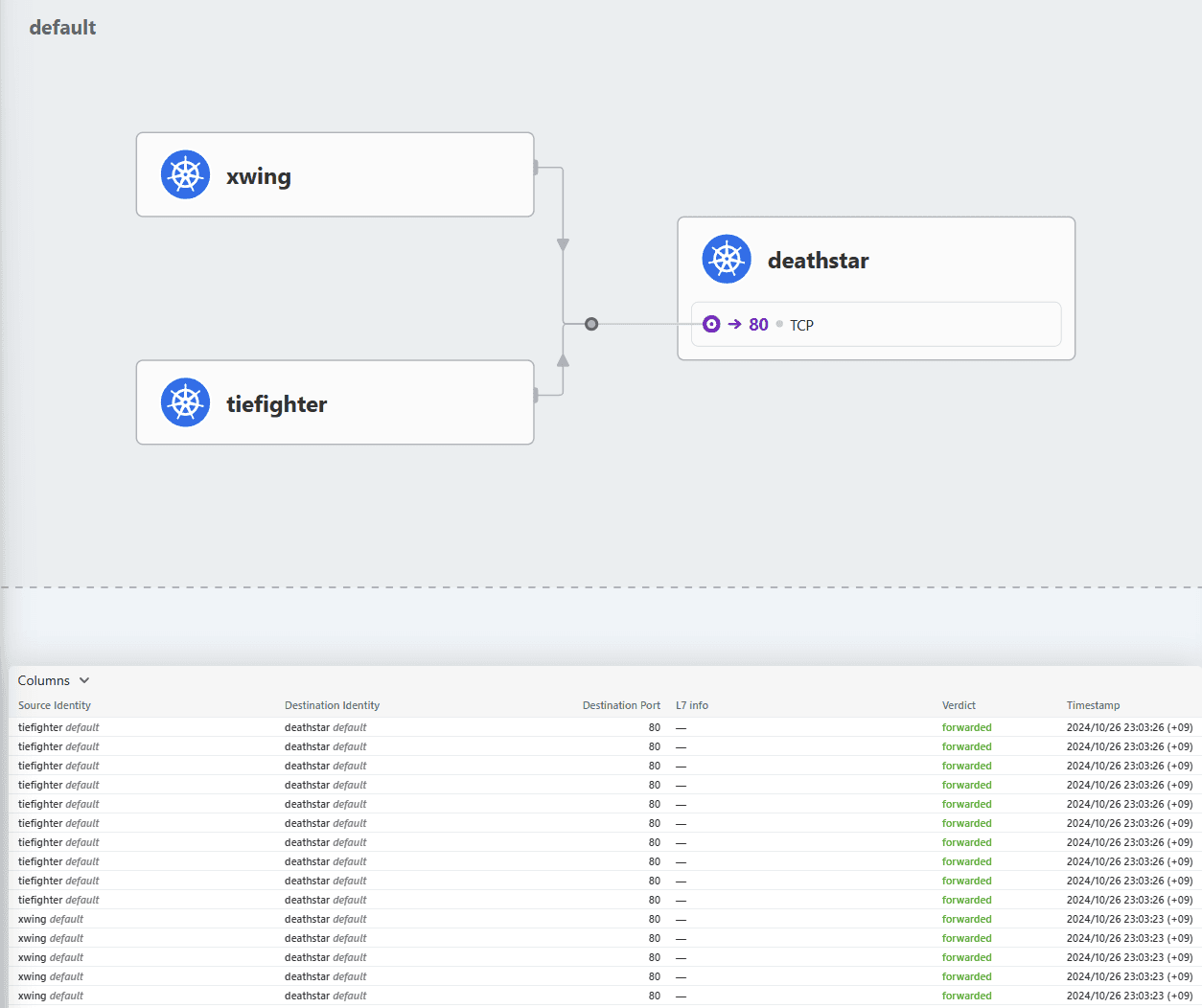
Identity-Aware and HTTP-Aware Policy Enforcement Apply an L3/L4 Policy - Link & Hubble CLI - 링크
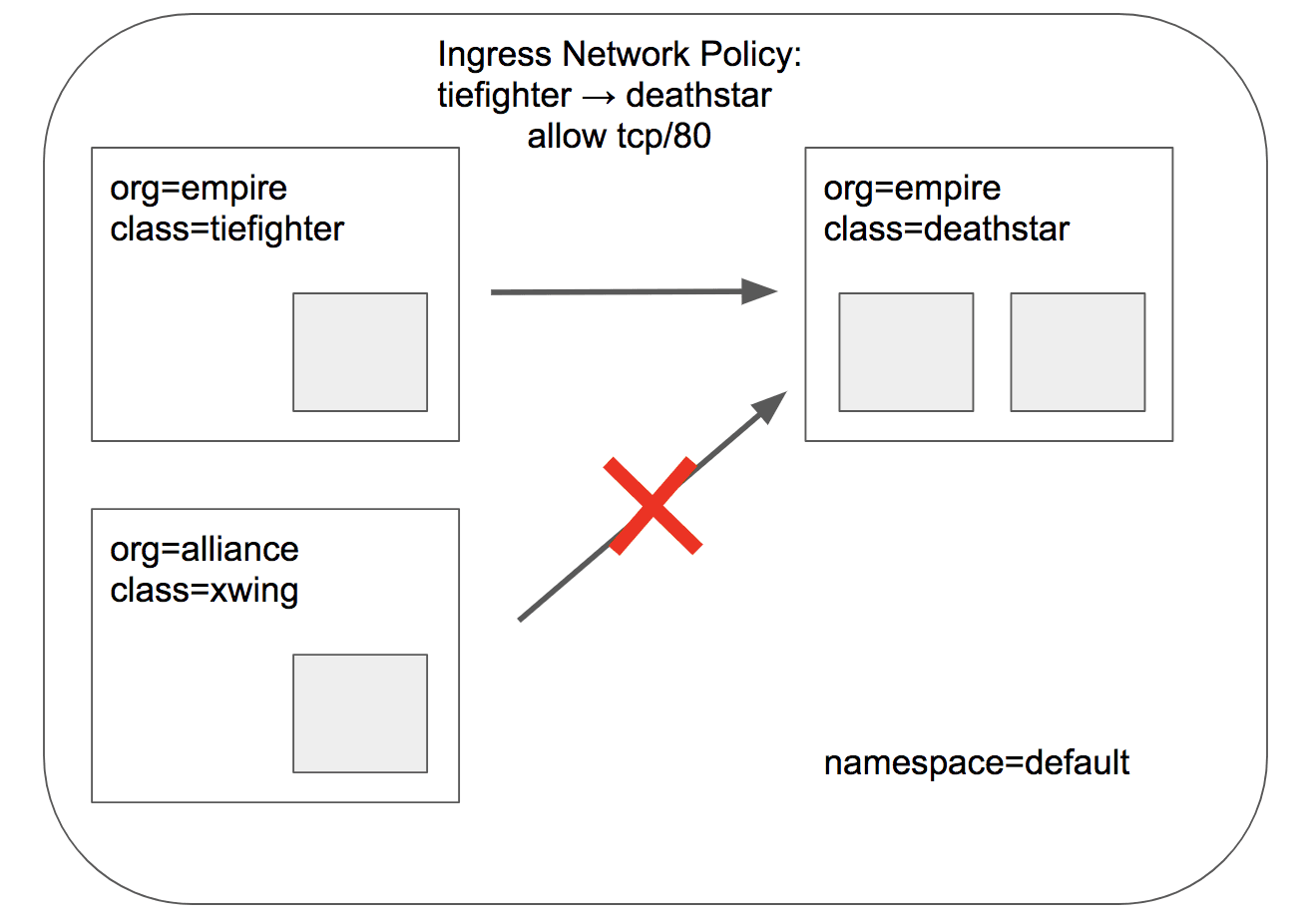
- Cilium 에서는 Endpoint IP 대신, 파드의 **Labels(라벨)**을 사용(기준)하여 보안 정책을 적용합니다
- IP/Port 필터링을 L3/L4 네트워크 정책이라고 한다
- 아래 처럼 ‘org=empire’ Labels(라벨) 부착된 파드만 허용해보자
- Cilium performs stateful connection tracking 이므로 리턴 트래픽은 자동으로 허용됨
# L3/L4 정책 생성
cat <<EOF | kubectl apply -f -
apiVersion: "cilium.io/v2"
kind: CiliumNetworkPolicy
metadata:
  name: "rule1"
spec:
  description: "L3-L4 policy to restrict deathstar access to empire ships only"
  endpointSelector:
    matchLabels:
      org: empire
      class: deathstar
  ingress:
  - fromEndpoints:
    - matchLabels:
        org: empire
    toPorts:
    - ports:
      - port: "80"
        protocol: TCP
EOF

# 정책 확인
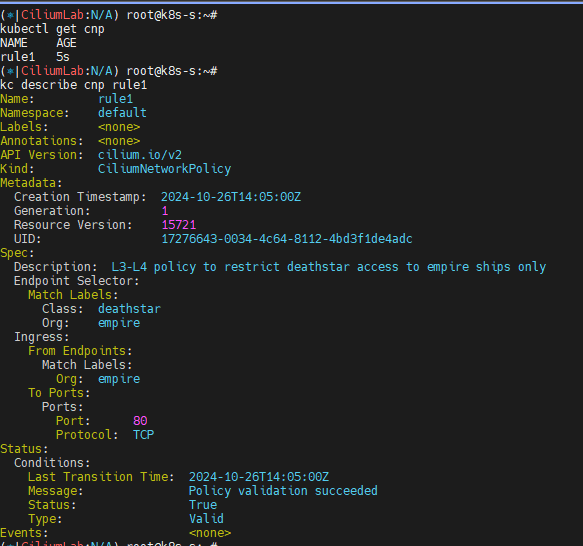
kubectl get cnp
kc describe cnp rule1
c0 policy get
# 파드 curl 접속 시도 시 파드 sh 접속 후 curl 시도하자!
# 데스스타 SVC(ClusterIP) 접속하여 웹 파드 연결 확인 >> Hubble UI 에서 drop 확인!
kubectl exec tiefighter -- curl -s -XPOST deathstar.default.svc.cluster.local/v1/request-landing
Ship landed

kubectl exec xwing -- curl -s -XPOST deathstar.default.svc.cluster.local/v1/request-landing
drop

# hubble cli 모니터링
hubble observe --pod xwing
hubble observe --pod tiefighter
hubble observe --pod deathstar
hubble observe --pod deathstar --verdict DROPPED

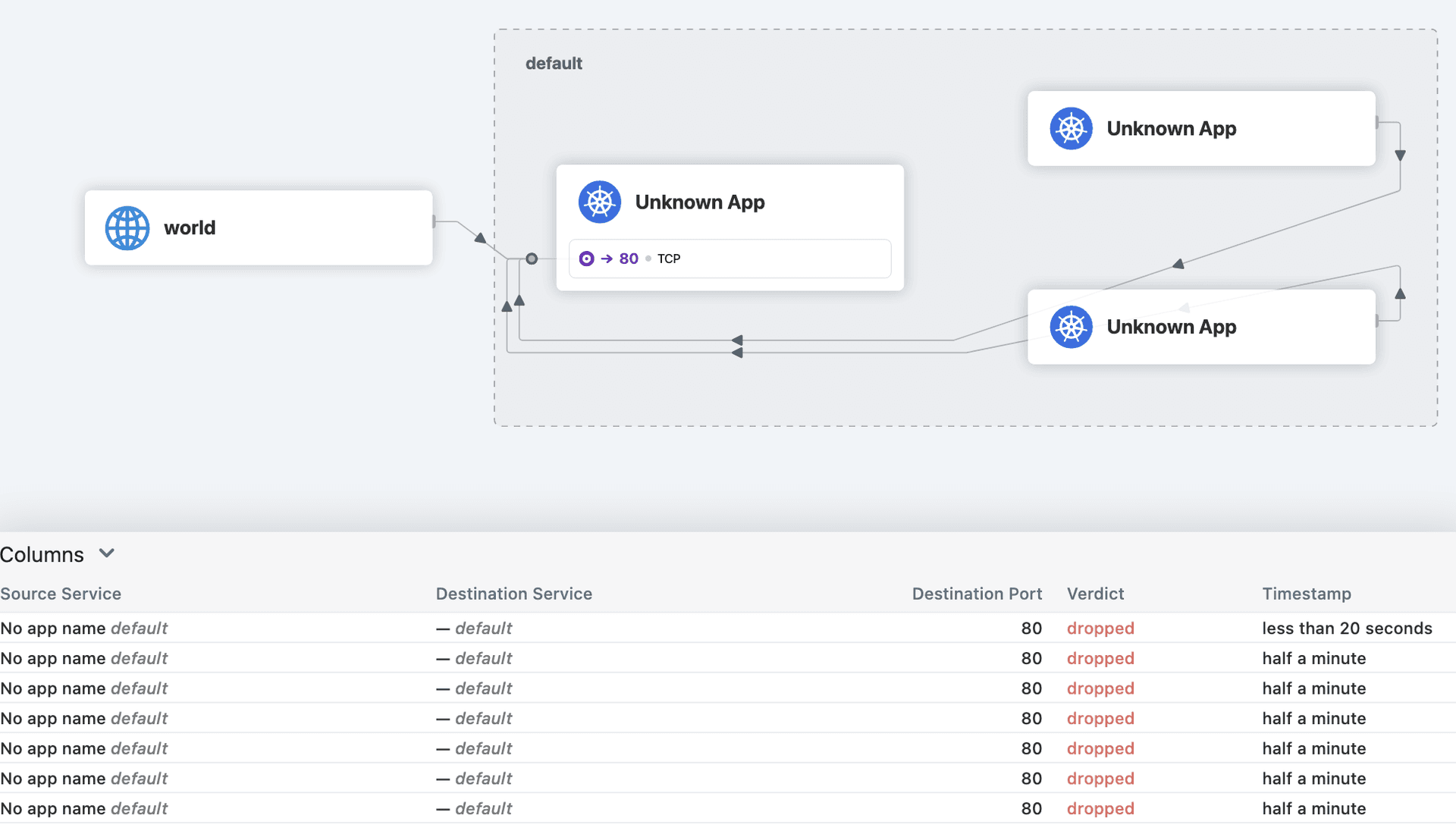
Inspecting the Policy
# If we run cilium endpoint list again we will see that the pods with the label org=empire and class=deathstar
# now have ingress policy enforcement enabled as per the policy above.

# endpoint list 에서 정책 적용 확인
c1 endpoint list | grep deathstar
c2 endpoint list | grep deathstar
Identity-Aware and HTTP-Aware Policy Enforcement Apply and Test HTTP-aware L7 Policy - Docs
- HTTP L7 필터링을 적용 : 아래 처럼 PUT /v1/exhaust-port 요청을 차단!
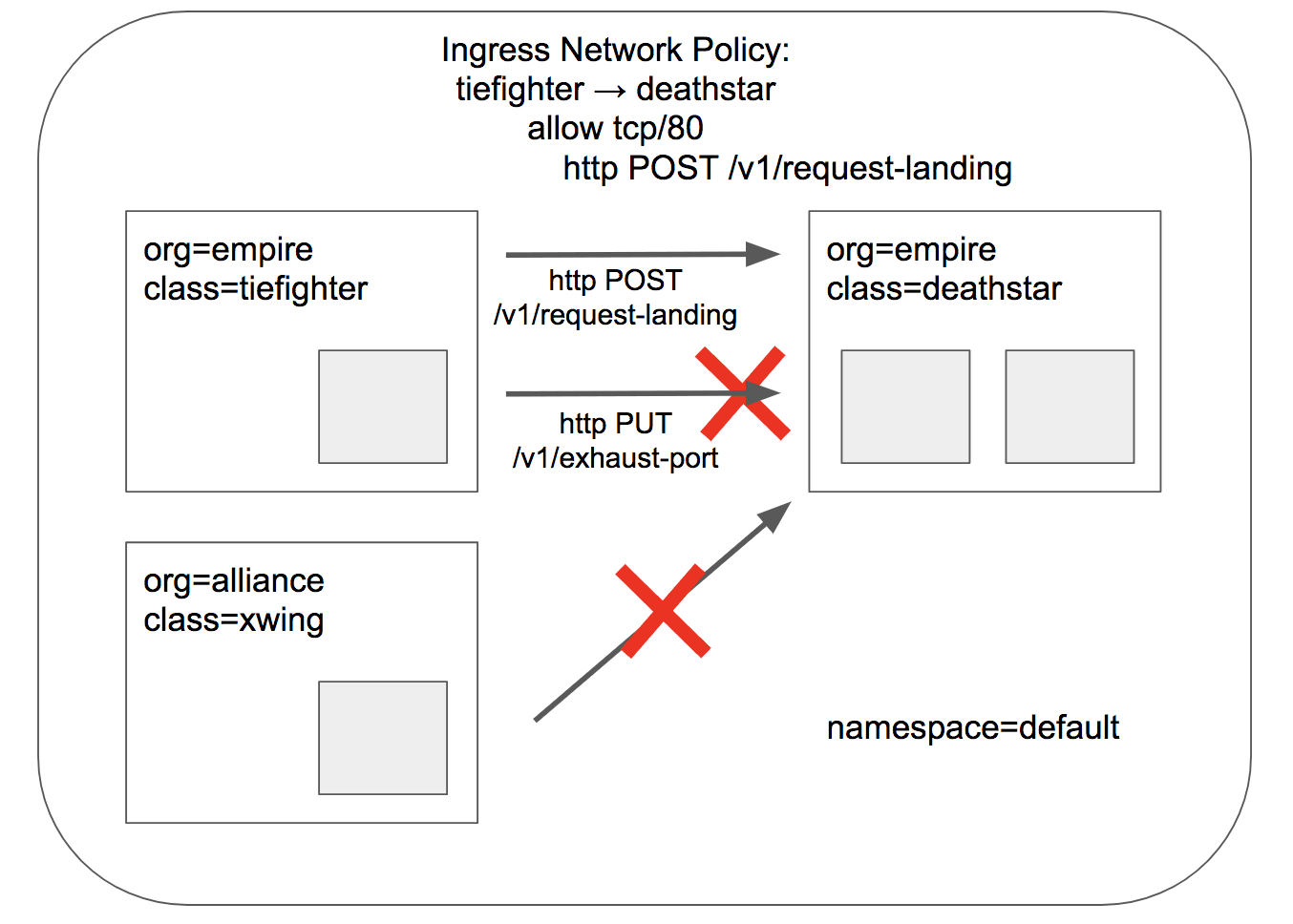
# 데스스타 SVC(ClusterIP) 접속
kubectl exec tiefighter -- curl -s -XPUT deathstar.default.svc.cluster.local/v1/exhaust-port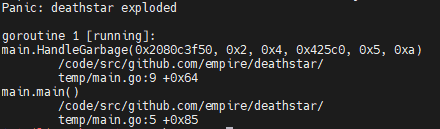
# POST /v1/request-landing API 호출만 허용 정책으로 기존 정책 내용을 업데이트(configured)!
cat <<EOF | kubectl apply -f -
apiVersion: "cilium.io/v2"
kind: CiliumNetworkPolicy
metadata:
  name: "rule1"
spec:
  description: "L7 policy to restrict access to specific HTTP call"
  endpointSelector:
    matchLabels:
      org: empire
      class: deathstar
  ingress:
  - fromEndpoints:
    - matchLabels:
        org: empire
    toPorts:
    - ports:
      - port: "80"
        protocol: TCP
      rules:
        http:
        - method: "POST"
          path: "/v1/request-landing"
EOF

# 정책 확인
kc describe ciliumnetworkpolicies
c0 policy get

# 모니터링
c1 monitor -v --type l7
c2 monitor -v --type l7
<- Request http from 0 ([k8s:io.cilium.k8s.policy.cluster=default k8s:io.cilium.k8s.policy.serviceaccount=default k8s:io.kubernetes.pod.namespace=default k8s:org=empire k8s:class=tiefighter k8s:io.cilium.k8s.namespace.labels.kubernetes.io/metadata.name=default]) to 1972 ([k8s:class=deathstar k8s:org=empire k8s:io.cilium.k8s.namespace.labels.kubernetes.io/metadata.name=default k8s:io.kubernetes.pod.namespace=default k8s:io.cilium.k8s.policy.serviceaccount=default k8s:io.cilium.k8s.policy.cluster=default]), identity 42720->21144, verdict Denied PUT http://deathstar.default.svc.cluster.local/v1/exhaust-port => 403
 => 403
hubble observe --pod deathstar
hubble observe --pod deathstar --verdict DROPPED
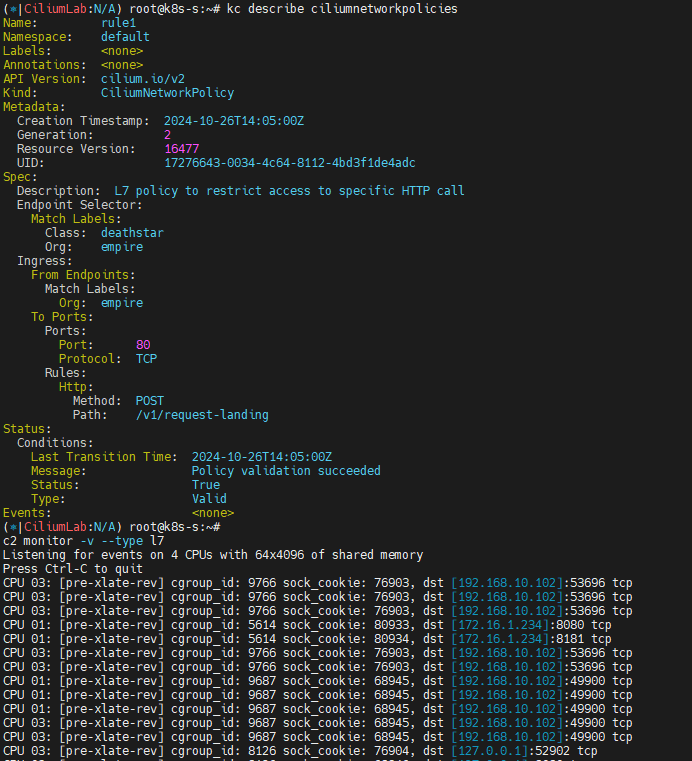
# 접근 테스트
kubectl exec tiefighter -- curl -s -XPOST deathstar.default.svc.cluster.local/v1/request-landing
Ship landed

kubectl exec tiefighter -- curl -s -XPUT deathstar.default.svc.cluster.local/v1/exhaust-port
Access denied

## hubble cli 에 차단 로그 확인
hubble observe --pod deathstar --verdict DROPPED

hubble observe --pod deathstar --protocol http
# 삭제
kubectl delete -f https://raw.githubusercontent.com/cilium/cilium/1.16.3/examples/minikube/http-sw-app.yaml
kubectl delete cnp rule1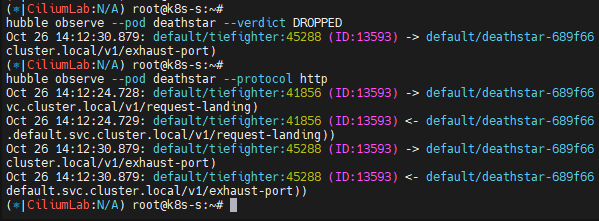
Bandwidth Manager
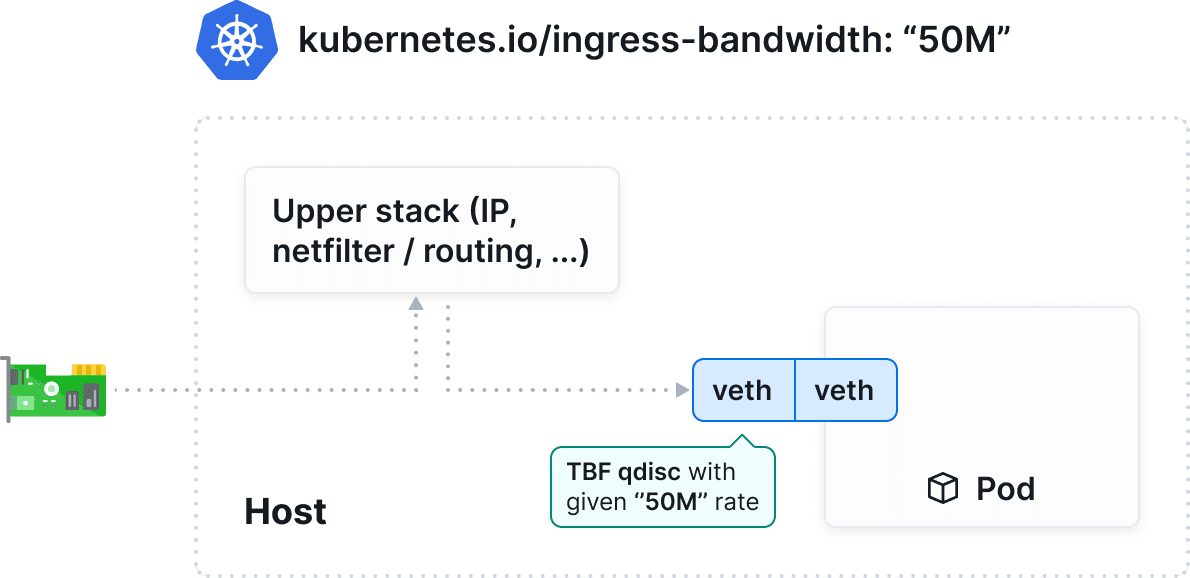
Bandwidth Manager를 이용한 성능 최적화 - Link , Home , Youtube
https://cilium.io/use-cases/bandwidth-optimization/
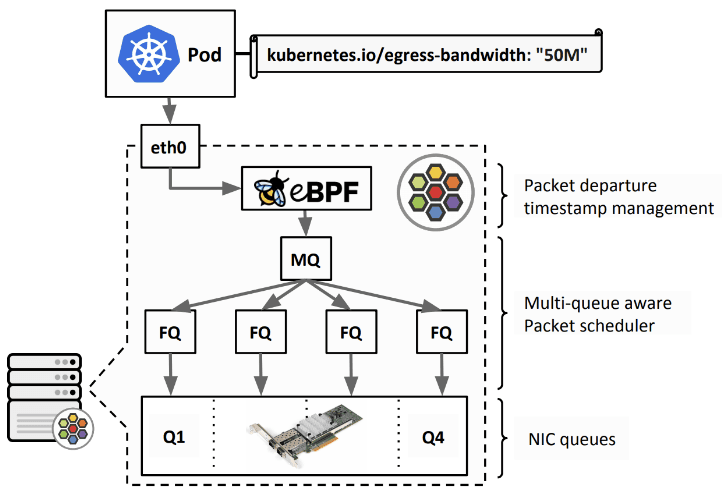
- bandwidth manager to optimize TCP and UDP workloads and efficiently rate limit individual Pods - EDT((Earliest Departure Time) 와 eBPF 사용
kubernetes.io/egress-bandwidthPod annotation which is enforced on egress at the native host networking devices.~~kubernetes.io/ingress-bandwidth~~ annotation is not supported- direct routing mode, tunneling mode 둘 다 지원
- Limitations : L7 Cilium Network Policies
설정 및 확인
# 인터페이스 tc qdisc 확인
tc qdisc show dev ens5

# 설정
helm upgrade cilium cilium/cilium --namespace kube-system --reuse-values --set bandwidthManager.enabled=true

# 적용 확인
cilium config view | grep bandwidth
enable-bandwidth-manager                       true

# egress bandwidth limitation 동작하는 인터페이스 확인
c0 status | grep  BandwidthManager
BandwidthManager:        EDT with BPF [CUBIC] [ens5]

# 인터페이스 tc qdisc 확인 : 설정 전후 옵션값들이 상당히 추가된다
tc qdisc
tc qdisc show dev ens5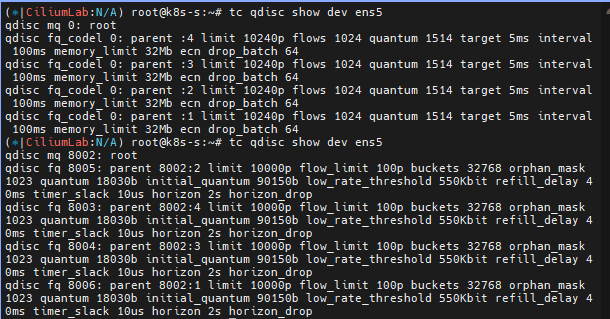
동작 및 확인
# 테스트를 위한 트래픽 발생 서버/클라이언트 파드 생성
cat <<EOF | kubectl apply -f -
---
apiVersion: v1
kind: Pod
metadata:
  annotations:
    # Limits egress bandwidth to 10Mbit/s.
    kubernetes.io/egress-bandwidth: "10M"
  labels:
    # This pod will act as server.
    app.kubernetes.io/name: netperf-server
  name: netperf-server
spec:
  containers:
  - name: netperf
    image: cilium/netperf
    ports:
    - containerPort: 12865
---
apiVersion: v1
kind: Pod
metadata:
  # This Pod will act as client.
  name: netperf-client
spec:
  affinity:
    # Prevents the client from being scheduled to the
    # same node as the server.
    podAntiAffinity:
      requiredDuringSchedulingIgnoredDuringExecution:
      - labelSelector:
          matchExpressions:
          - key: app.kubernetes.io/name
            operator: In
            values:
            - netperf-server
        topologyKey: kubernetes.io/hostname
  containers:
  - name: netperf
    args:
    - sleep
    - infinity
    image: cilium/netperf
EOF
# egress BW 제한 정보 확인
kubectl describe pod netperf-server | grep Annotations:
Annotations:  kubernetes.io/egress-bandwidth: 10M

# egress BW 제한이 설정된 파드가 있는 cilium pod 에서 제한 정보 확인
c1 bpf bandwidth list
c2 bpf bandwidth list
# 트래픽 발생 >> Hubble UI 에서 확인
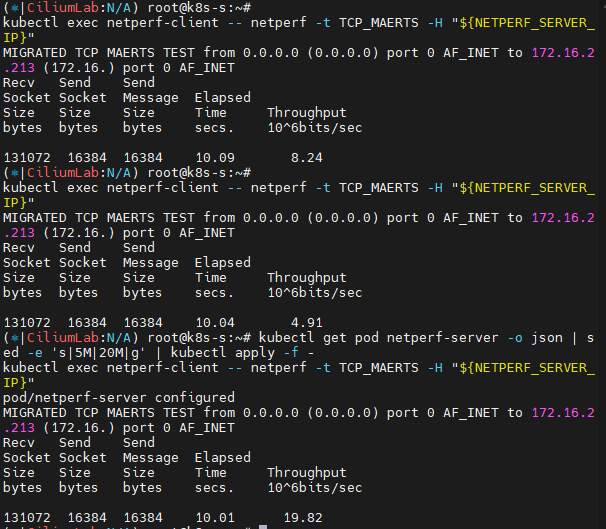
# egress traffic of the netperf-server Pod has been limited to 10Mbit per second.
NETPERF_SERVER_IP=$(kubectl get pod netperf-server -o jsonpath='{.status.podIP}')
kubectl exec netperf-client -- netperf -t TCP_MAERTS -H "${NETPERF_SERVER_IP}"


# 5M 제한 설정 후 테스트
kubectl get pod netperf-server -o json | sed -e 's|10M|5M|g' | kubectl apply -f -
c1 bpf bandwidth list
c2 bpf bandwidth list
kubectl exec netperf-client -- netperf -t TCP_MAERTS -H "${NETPERF_SERVER_IP}"

# 20M 제한 설정 후 테스트
kubectl get pod netperf-server -o json | sed -e 's|5M|20M|g' | kubectl apply -f -
kubectl exec netperf-client -- netperf -t TCP_MAERTS -H "${NETPERF_SERVER_IP}"

# 삭제
kubectl delete pod netperf-client netperf-server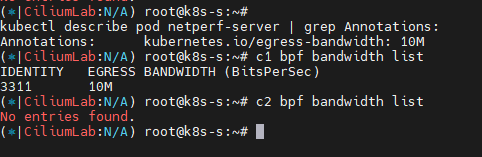
L2 Announcement
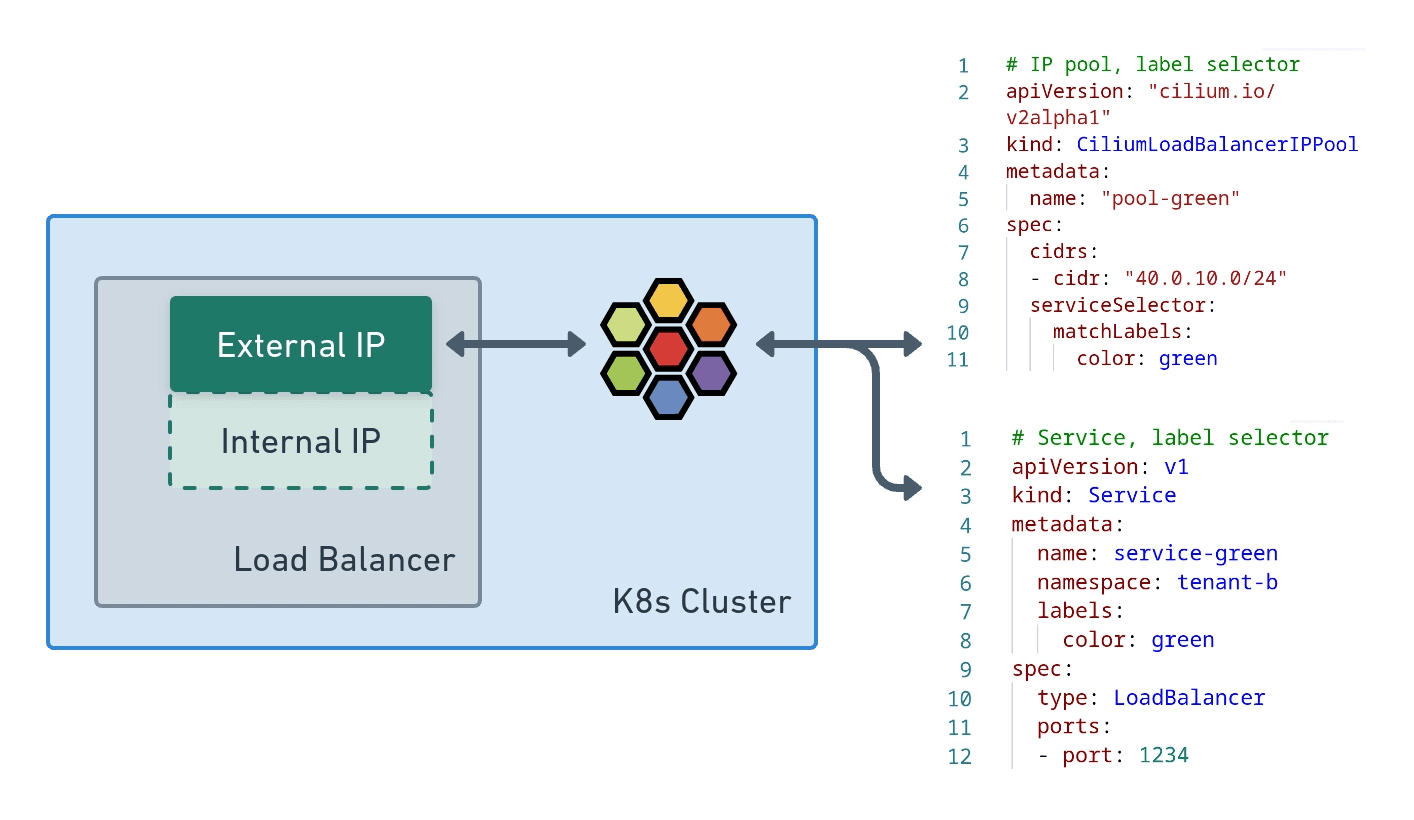
L2 Announcements / L2 Aware LB (Beta) - Link , Blog
- L2 Announcements의 역할: 로컬 네트워크(LAN)에서 서비스가 표시되고 접근 가능하도록 만들어 주는 기능입니다. 주로 BGP 기반 라우팅이 없는 온프레미스 네트워크(예: 사무실 또는 캠퍼스 네트워크)에서 사용하기에 적합합니다.
- 작동 방식:
- ExternalIP 또는 LoadBalancer IP에 대한 ARP 쿼리에 응답하여 해당 IP를 서비스합니다.
- 이러한 IP는 여러 노드의 가상 IP이므로, 각 서비스에 대해 한 번에 하나의 노드만 ARP 쿼리에 응답하여 MAC 주소로 응답합니다.
- 이 노드는 서비스의 로드 밸런싱 역할을 하며, 북-남 방향 트래픽을 담당하는 로드 밸런서로 기능합니다.
- NodePort 서비스와 비교한 장점:
- 각 서비스가 고유한 IP를 사용하므로, 여러 서비스가 동일한 포트 번호를 사용할 수 있습니다.
- NodePort에서는 클라이언트가 트래픽을 보낼 호스트를 선택해야 하며, 노드가 다운되면 IP+포트 조합을 사용할 수 없게 됩니다.
- 반면 L2 공지를 사용하면 서비스 VIP가 다른 노드로 자동 마이그레이션되어 서비스가 중단 없이 계속 유지됩니다.
https://isovalent.com/blog/post/migrating-from-metallb-to-cilium/
설정 및 확인
#
helm upgrade cilium cilium/cilium --namespace kube-system --reuse-values \
--set l2announcements.enabled=true --set externalIPs.enabled=true \
--set l2announcements.leaseDuration=3s --set l2announcements.leaseRenewDeadline=1s --set l2announcements.leaseRetryPeriod=200ms

#
c0 config --all  |grep L2
EnableL2Announcements             : true
EnableL2NeighDiscovery            : true

# CiliumL2AnnouncementPolicy 생성
cat <<EOF | kubectl apply -f -
apiVersion: "cilium.io/v2alpha1"
kind: ciliumL2AnnouncementPolicy
metadata:
  name: policy1
spec:
  serviceSelector:
    matchLabels:
      color: blue
  nodeSelector:
    matchExpressions:
      - key: node-role.kubernetes.io/control-plane
        operator: DoesNotExist
  interfaces:
  - ^ens[0-9]+
  externalIPs: true
  loadBalancerIPs: true
EOF

# 확인
kubectl get ciliuml2announcementpolicy
kc describe l2announcement

#
cat <<EOF | kubectl apply -f -
apiVersion: "cilium.io/v2alpha1"
kind: ciliumLoadBalancerIPPool
metadata:
  name: "cilium-pool"
spec:
  allowFirstLastIPs: "No"
  blocks:
  - cidr: "10.10.200.0/29"
EOF

# cilium ip pool 조회
kubectl get CiliumLoadBalancerIPPool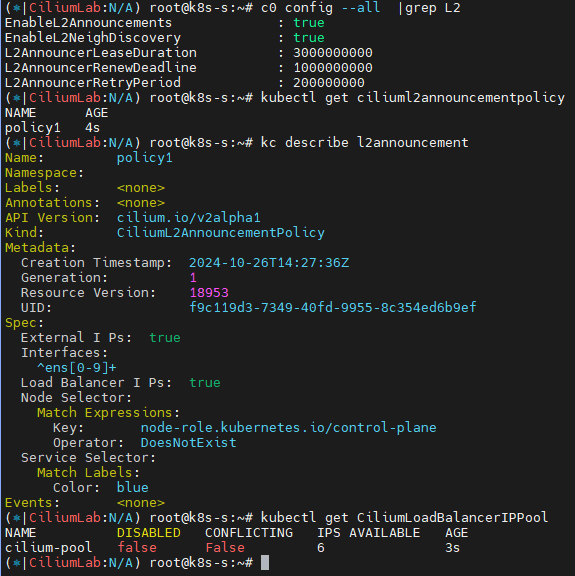
- 테스트용 파드, 서비스 생성
#
cat <<EOF | kubectl apply -f -
apiVersion: v1
kind: Pod
metadata:
  name: webpod1
  labels:
    app: webpod
spec:
  nodeName: k8s-w1
  containers:
  - name: container
    image: traefik/whoami
  terminationGracePeriodSeconds: 0
---
apiVersion: v1
kind: Pod
metadata:
  name: webpod2
  labels:
    app: webpod
spec:
  nodeName: k8s-w2
  containers:
  - name: container
    image: traefik/whoami
  terminationGracePeriodSeconds: 0
---
apiVersion: v1
kind: Service
metadata:
  name: svc1
spec:
  ports:
    - name: svc1-webport
      port: 80
      targetPort: 80
  selector:
    app: webpod
  type: LoadBalancer
---
apiVersion: v1
kind: Service
metadata:
  name: svc2
spec:
  ports:
    - name: svc2-webport
      port: 80
      targetPort: 80
  selector:
    app: webpod
  type: LoadBalancer
---
apiVersion: v1
kind: Service
metadata:
  name: svc3
spec:
  ports:
    - name: svc3-webport
      port: 80
      targetPort: 80
  selector:
    app: webpod
  type: LoadBalancer
EOF- 접속 확인
#
kubectl get svc,ep

#
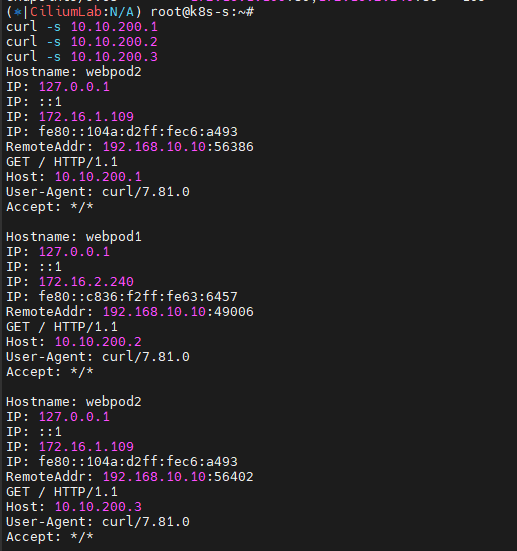
curl -s 10.10.200.1
curl -s 10.10.200.2
curl -s 10.10.200.3

# 삭제
~
- Cilium 에 L3 Announcement over BGP 실습 구성 및 동작 테스트 후 정리 - Docs , Blog
-
L3 Announcement over BGP : LoadBalancer IP Address Management (LB IPAM) - Link
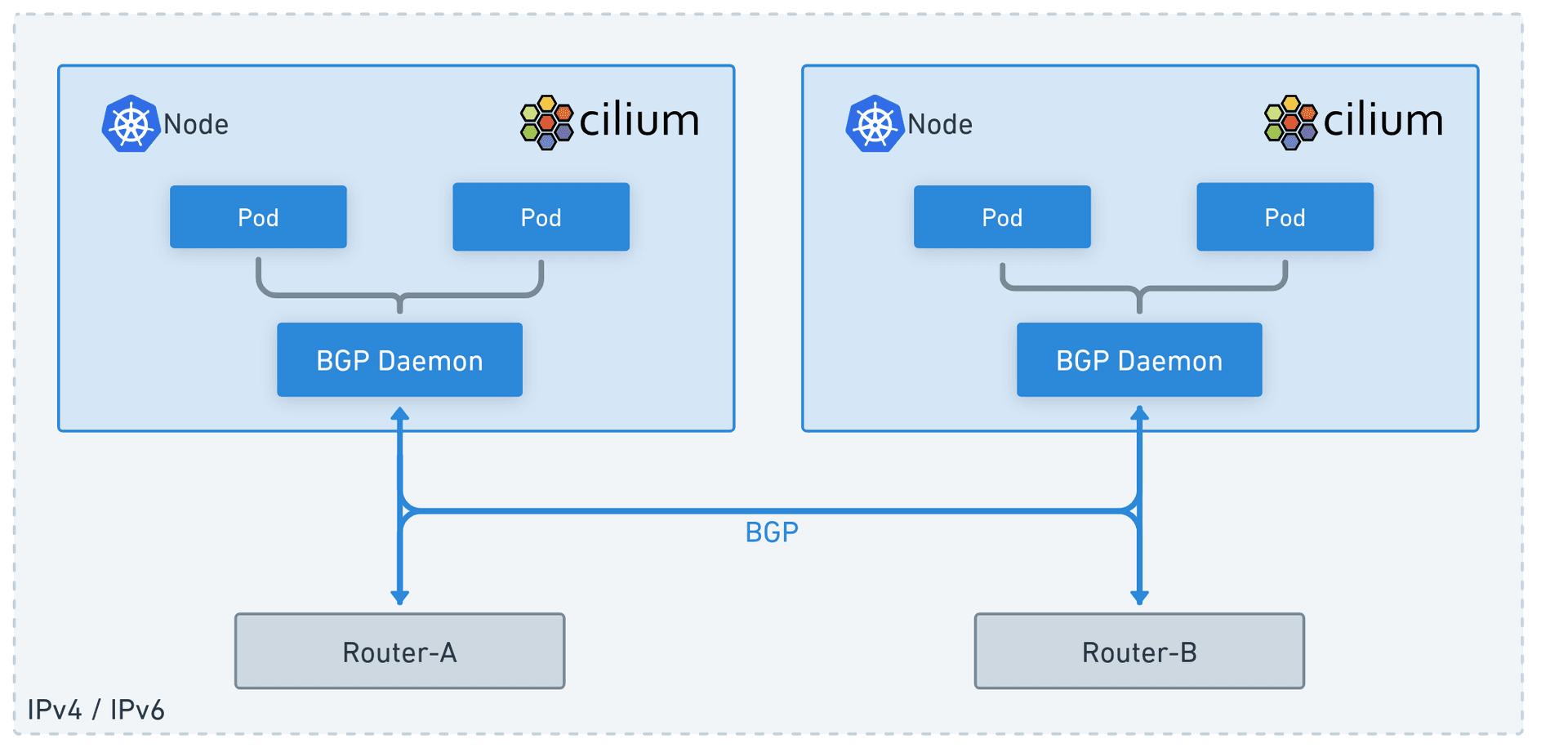
https://isovalent.com/blog/post/migrating-from-metallb-to-cilium/
-