Ingress Extensions
Ingress Controller에 다양한 Extensions를 추가하여 확장하는 형태에 대해 다루어봅니다.
auth proxy
ingress 의 모든것 이라는 게시글에서도 다룬 ingress 페이지 인증/인가 시스템의 확장입니다.
addon 을 통한 추가적인 계정 통합을 위한 연동이 가능합니다. 구조는 동일하지만, 뒤에 인증/인가를 거치는 시스템을 더 고도화하여 구성이 가능하다는 특징이 있습니다.
연동 가능한 시스템들은 oauth2 를 이용한 추가적인 인증시스템 구성
AD/LDAP 서버 구성을 통한 인증시스템 구성
https://github.com/dignajar/another-ldap
등이 존재합니다. 현재 구성해본 시스템으로는 oauth2 proxy가 아닌 another ldap 을 이용한 AD계정의 연동이 있습니다만, 자세한 내용을 다룰수는 없지만 인증 과정자체를 이해하면 어떤 시스템이든 연동자체가 가능하다는 개념을 이해하면 될것같습니다.
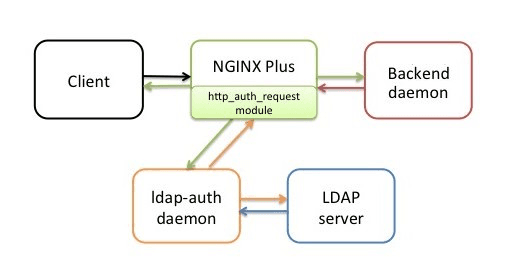
생성하는 ingress 의 annotation에 auth-url , auth-response-headers, auth-snippet 구성등을 통해 인증서버 경유를 통하게 구성이 가능합니다.
현재 구성된 Keycloak 기반 인증시스템 에서도 동일한 구성을 통해 인증/인가 시스템 구성이 가능합니다.
아래는 구성된 Prometheus 와 Thanos 도메인에 간단한 응답을 보내 응답을 받는 코드입니다. 현재 prometheus 서버에는 HTTP Auth 가 적용되어있고, Thanos 서버는 적용되어있지 않습니다.
import requests
from requests.auth import HTTPBasicAuth

# Prometheus/Thanos API 도메인 설정
thanos_domain = "http://<>/api/v1/query"
prometheus_domain = "http:/<>/api/v1/query"

promql_query = 'count(up{job="node-exporter"} == 1)'  # 첫 번째 PromQL 쿼리

# 헤더에 넣을 ID와 비밀번호 설정
username = "<>"  # 사용자 ID
password = "<>"  # 사용자 비밀번호

# # Prometheus/Thanos API 쿼리 함수
def query_thanos(promql_query):

   response = requests.get(thanos_domain, params={'query': promql_query})
   if response.status_code == 200:
       return response.json()['data']['result']
   else:
       print(f"Error querying Prometheus: {response.status_code}, {response.text}")
       return None

def query_prometheus(promql_query):
   response = requests.get(prometheus_domain, params={'query': promql_query}, auth=HTTPBasicAuth(username, password))
   if response.status_code == 200:
       return response.json()['data']['result']
   else:
       print(f"Error querying Prometheus: {response.status_code}, {response.text}")
       return None

result = query_thanos(promql_query)
print(f"Local Metrics: {promql_query}")
print(result)

result = query_prometheus(promql_query)
print(f"Local Metrics: {promql_query}")
print(result)
Grafana에서도, Data Source의 Authentication에서 Basic Authentication에 User / Password를 저장할경우 동일한 결과를 응답받을수 있습니다.
Nginx Error redirection
https://github.com/kubernetes/ingress-nginx/tree/main/docs/examples/customization/custom-errors
프로젝트 활용
redirect pages
tree
ㄴ404.html
ㄴ500.html
ㄴ503.html
custom 할 pages 직접 html 구현
Dockerfile
FROM quay.io/kubernetes-ingress-controller/custom-error-pages-amd64:0.4

COPY www /www
Readme

# custom-nginx-ingress-errors
Assets to build a container to provide a custom default backend to the nginx-ingress Kubernetes Ingress controller

## Editing Error Pages

The container has a set of error HTML and JSON files that are returned based on the error code.  These files are stored in the `www/` directory and are copied to the `/www/` directory in the container.

1. Fork this repo, modify the error pages as you see fit.
2. Connect to Docker Hub/Quay.io to build an image you have access to.
3. Modify the `k8s-deployment.yaml` file to point to your custom built image.

## Deploying a custom default-backend for Nginx Ingress

Note: This is for the Kubernetes Nginx Ingress, not the one made by Nginx.
If you haven't deployed it yet, here ya go: https://kubernetes.github.io/ingress-nginx/deploy/

These instructions assume that you deployed this in the default `ingress-nginx` namespace.

1. Modify the `k8s-deployment.yaml` file to point to your custom built image, or use it as is for some snazzy error pages
2. Deploy to the Kubernetes cluster: `kubectl apply -f k8s-deployment.yaml`
3. Modify the `ingress-nginx/ingress-nginx-controller` Deployment and set the value of the `--default-backend-service` flag to the name of the newly created error backend, which should be `ingress-nginx/nginx-errors` by default.
4. Edit the `ingress-nginx/nginx-configuration` ConfigMap  and add the key:value pair of `"custom-http-errors": "404,500,503"`
5. ??????
6. PROFIT!!!!1
deployment
---
apiVersion: v1
kind: Service
metadata:
  name: nginx-errors
  namespace: ingress-nginx
  labels:
    app.kubernetes.io/name: nginx-errors
    app.kubernetes.io/part-of: ingress-nginx
spec:
  selector:
    app.kubernetes.io/name: nginx-errors
    app.kubernetes.io/part-of: ingress-nginx
  ports:
  - port: 80
    targetPort: 8080
    name: http
---
apiVersion: apps/v1
kind: Deployment
metadata:
  name: nginx-errors
  namespace: ingress-nginx
  labels:
    app.kubernetes.io/name: nginx-errors
    app.kubernetes.io/part-of: ingress-nginx
spec:
  replicas: 1
  selector:
    matchLabels:
      app.kubernetes.io/name: nginx-errors
      app.kubernetes.io/part-of: ingress-nginx
  template:
    metadata:
      labels:
        app.kubernetes.io/name: nginx-errors
        app.kubernetes.io/part-of: ingress-nginx
    spec:
      containers:
      - name: nginx-error-server
        image: kenmoini/custom-nginx-ingress-errors:latest
        ports:
        - containerPort: 8080
        # Setting the environment variable DEBUG we can see the headers sent
        # by the ingress controller to the backend in the client response.
        # env:
        # - name: DEBUG
        #   value: "true"
Ingress Nginx Controller
ingress 설정 파일에서의 configuration
  controller-http-errors: "404, 503"
  config:
    ssl-redirect: "true"
    hsts: "false"
    use-forwarded-headers: "true"
    custom-http-errors: "503"
    proxy-body-size: 30m
    proxy-read-timeout: "3600"
    proxy-send-timeout: "3600"
    enable-underscores-in-headers: "true"
    ignore-invalid-headers: "false"
    http-snippet: |
      proxy_socket_keepalive on;
  watchIngressWithoutClass: true
  electionID: ingress-controller-leader
  extraArgs:
    default-backend-service: "ingress-nginx/nginx-errors"
Gateway API Examples For F5
쿠버네티스 코리아그룹 밋업 10주년 행사에서 들었던 nginx gateway api 세션에서의 데모들입니다.
간단하게 Examples 폴더 내에있는 기능들로만도 충분히 테스트가 가능합니다.
기존의 L7 레이어의 http/https 라우팅 이상의 기능들에 대해 테스트가 가능합니다.
(현재로서) ingress 와 유의미하게 구분되는 기능들의 경우 traffic splitting 과 cross namespace routing 인거같습니다.
ingress로서의 태생적 한계점을 벗어난 가시적인 기능인거같습니다.
다른 기능들도 추가적으로 검토해보면 좋을것같습니다.
cross namepsace routing
grpc routing
tls termination
등의 기능들이 존재합니다.
각 기능들을 Examples 폴더안에 있는 코드대로 실행해보면 조금 더 이해가 잘 되리라 생각합니다.